
Retail & GS1 QR codes
Create product-backed GS1 Digital Link QR and GS1 DataMatrix assets with standards-aware validation.
Retail & GS1 QR codes
Retail & GS1 helps Professional and Enterprise workspaces create product-backed 2D code assets from validated GS1 inputs. Open it from QR CodesRetail & GS1.
Use it to:
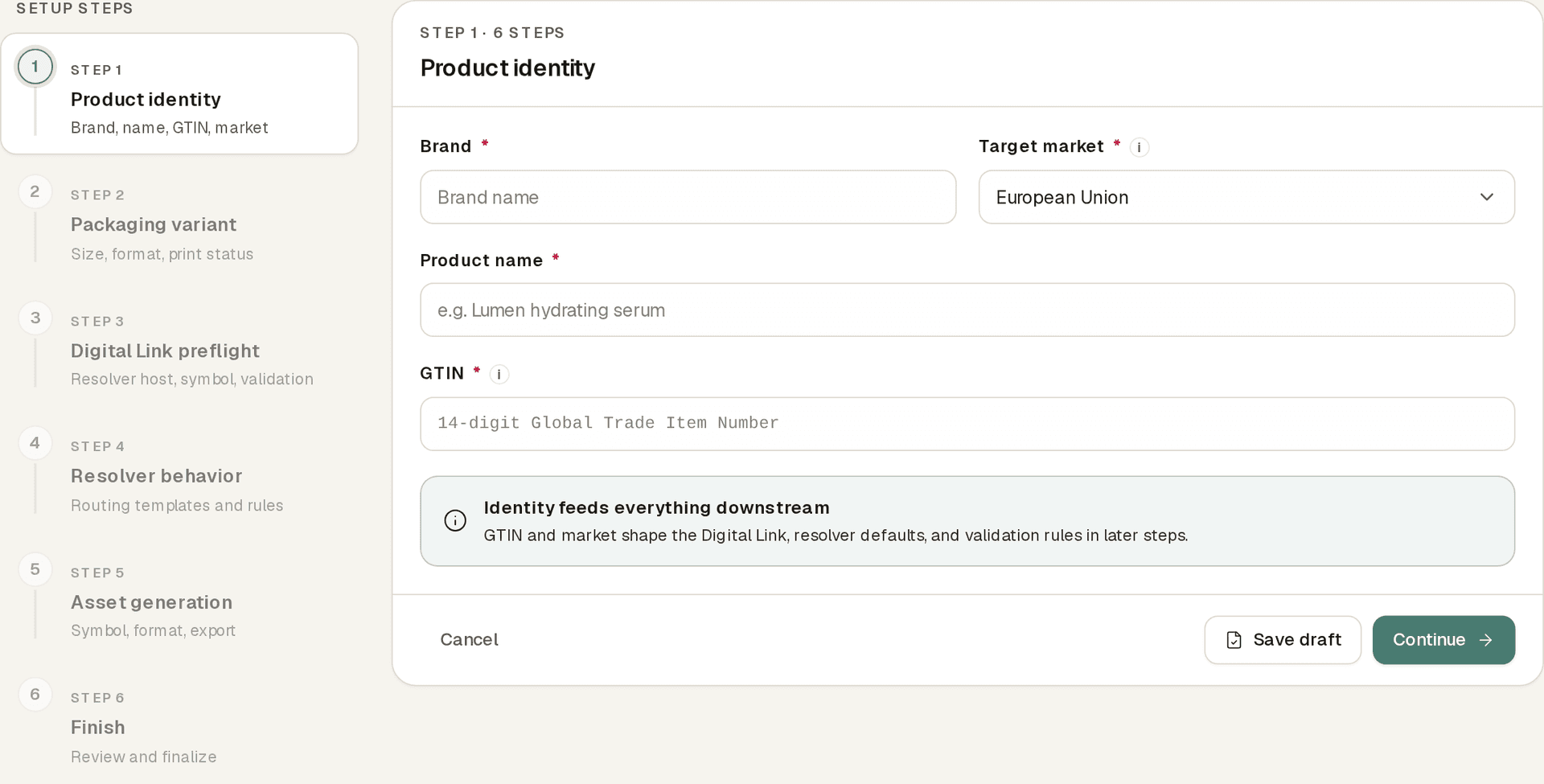
- Create product records with brand, product name, target market, and GTIN.
- Add packaging variants for package size, format, artwork version, and print status.
- Validate GS1 Digital Link identifiers before generating assets.
- Generate conservative GS1 Digital Link QR codes and GS1 DataMatrix assets.
- Configure resolver rules for consumer, retail/POS, supply-chain, linkset, and fallback behavior.
- Queue ZIP exports of generated assets, with optional validation report files.
Nimriz provides standards-aware validation. It does not assign GTINs, replace your GS1 account, or certify that a printed code is accepted by a retailer, POS system, or supply-chain partner.
Guided workflow
Retail & GS1 opens to your products. A readiness strip above the table surfaces blocked and at-risk products and readiness counts, and each count doubles as a filter.
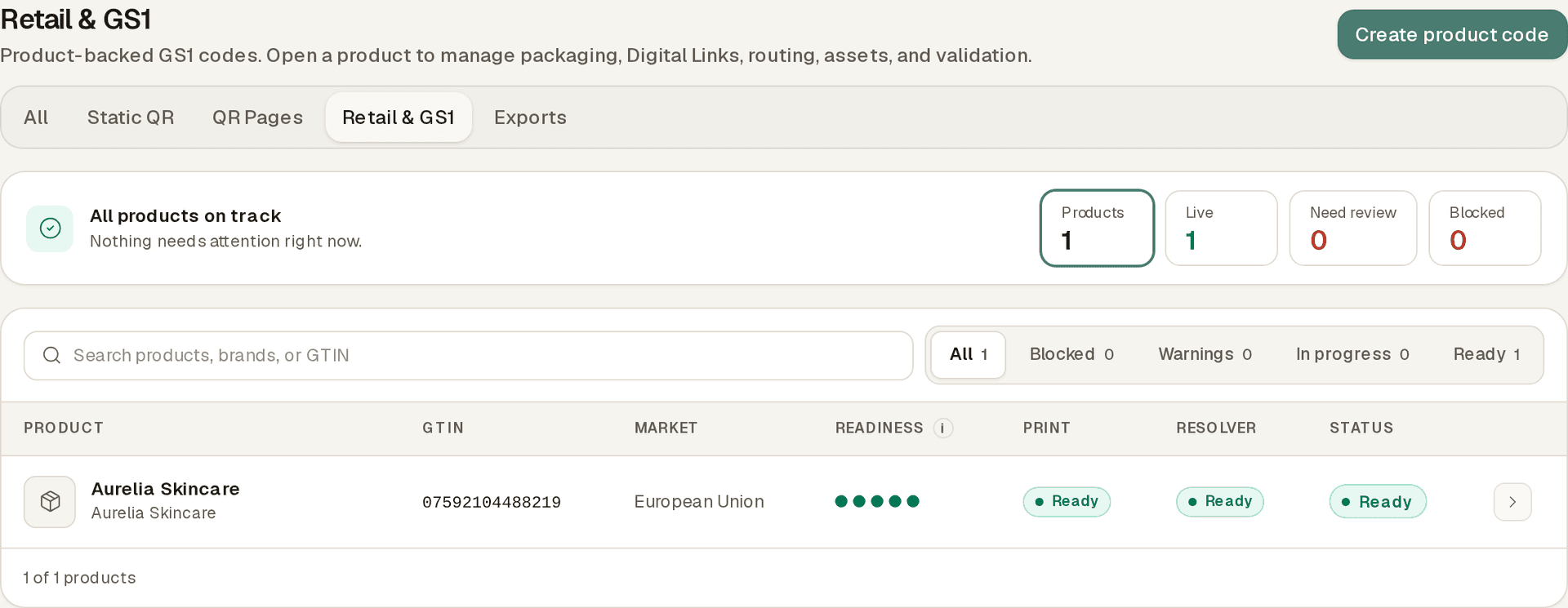
Unfinished setups appear in a drafts list, so you can resume a Create product code flow at the step you reached. Use Create product code to move through product identity, packaging, Digital Link preflight, resolver behavior, asset generation, and final review in order. You can save a draft at any step and pick it up later.
Product workspace tabs
Each product workspace opens with a readiness strip, two gates for print-ready and resolver-ready plus setup completeness, above its section tabs:
- Overview: see readiness for packaging, Digital Links, resolver rules, generated assets, validation, and activity.
- Packaging: add package size, format, artwork version, and print status.
- Digital Links: preflight GS1 inputs, review the canonical URI, then save the Digital Link.
- Resolver: configure consumer, retail/POS, supply-chain, linkset, or fallback routes with templates and priorities.
- Assets: generate GS1 QR or GS1 DataMatrix assets, download one asset, or queue a ZIP export.
- Validation: review errors, warnings, normalized identifiers, and scanability settings from saved validation reports.
- Activity: review privacy-safe resolver rollups after scans are archived and rollups run.
Product and packaging records
Product records keep the identity context for the generated assets. They can include brand, product name, target market, and GTIN.
Packaging variants keep print and packaging context, such as package size, format, artwork version, and print status. Use packaging variants when the same product needs separate assets or validation reports for different package formats.
Supported identifiers
The current Retail & GS1 module supports:
| Application identifier | Field | Notes |
|---|---|---|
01 | GTIN | Required. Nimriz normalizes GTIN-8, GTIN-12, GTIN-13, and GTIN-14 to 14 digits and checks the digit. |
22 | Consumer product variant | Optional path qualifier. |
10 | Batch or lot | Optional path qualifier. |
21 | Serial | Optional path qualifier. |
17 | Expiry date | Optional query parameter (?17=). Accepts YYMMDD or YYYY-MM-DD. |
The validator returns errors for invalid GTINs, malformed qualifiers, unsafe resolver hosts, unsafe render settings, and non-canonical URI shapes. It may also return warnings when an input is valid but needs review before printing.
Digital Link QR and DataMatrix
GS1 Digital Link QR encodes the canonical HTTPS resolver URI. Nimriz uses a conservative black-on-white style for these assets so branding does not weaken scan reliability.
GS1 DataMatrix encodes the validated GS1 element string. This is useful when a partner or workflow expects a DataMatrix symbol rather than a QR code.
Before printing, test every downloaded asset on the physical package, label, or proof. Scan performance depends on print size, substrate, contrast, lighting, and placement.
Validation reports
Validation reports show errors, warnings, normalized identifiers, canonical URI details, and scanability settings from the saved validation run.
Use errors as blockers before generating or printing assets. Treat warnings as review signals, especially when a value is valid but should be confirmed against your source data, packaging requirements, or partner instructions.
Export generated assets
Use the Generated assets list to download one asset at a time or queue a ZIP export.
Retail & GS1 ZIP exports appear in Exports with your other async jobs. The ZIP includes a manifest.json with each selected code, output file name, validation status, and any failed render details. When validation reports are included, they are added as JSON files under validation-reports/.
See Exports for the shared async job and manifest details.
Resolver rules
Resolver rules decide what happens when a GS1 Digital Link URL is requested on your configured resolver host.
Supported modes:
- Consumer: redirect shoppers to a configured product or campaign URL.
- Retail/POS: return JSON for configured retail/POS use.
- Supply-chain: return JSON for configured supply-chain use.
- Linkset: return linkset JSON for available links.
- Fallback: provide a default when no more specific rule applies.
Rules use explicit request fields such as context, mode, linkType, language, and country. Nimriz does not guess retail/POS or supply-chain behavior from User-Agent strings.
API access
Retail & GS1 API endpoints are available to Professional and Enterprise workspaces with QR API access. They require the same workspace API key as other customer API calls.
Retail & GS1 endpoints can create products, packaging variants, Digital Links, generated code assets, resolver rules, and validation responses. There is no unauthenticated GS1 generation API.
See API reference for authentication, endpoint shape, entitlement behavior, and errors.
Analytics and privacy
GS1 resolver activity is separate from standard short-link QR analytics.
Nimriz archives resolver activity and rolls it up into aggregate reports. Raw IP addresses and full User-Agent strings are not stored in resolver analytics, and GS1 resolver scans do not change existing short-link click or QR scan counters.
GS1 resolver activity follows your workspace privacy setting and your organization's privacy policy. Standard mode may retain daily-salted visitor hashes. Strict mode omits those hashes while keeping aggregate activity reporting. If privacy settings are temporarily unavailable, Nimriz omits visitor hashes.
Print testing and limitations
Before production use:
- Confirm your GTIN ownership and source data accuracy.
- Confirm retailer, POS, supply-chain, or partner requirements outside Nimriz.
- Resolve validation errors and review warnings.
- Download the final asset and test it on the physical package, label, or proof.
- Test with the scanner, phone, or partner workflow your audience is expected to use.
Nimriz provides standards-aware validation and asset generation. It does not guarantee legal compliance, retailer acceptance, scanner acceptance, or printed-code performance in every environment.
Related
Related next steps
Follow setup and reference guides for Nimriz products and integrations.
A practical introduction to GS1 Digital Link, product identifiers, resolver rules, QR and DataMatrix assets, and packaging claim boundaries.
Explore Nimriz Retail & GS1 QR capabilities: product records, packaging variants, GS1 Digital Link validation, QR and DataMatrix assets, resolver rules, exports, and API support.
Use this Retail and GS1 worksheet to review product data, identifiers, validation reports, resolver rules, assets, and print testing before packaging handoff.
Ready to test this setup?
Create an account to try the workflow, or compare plans when the setup needs higher limits, integrations, or team controls.