
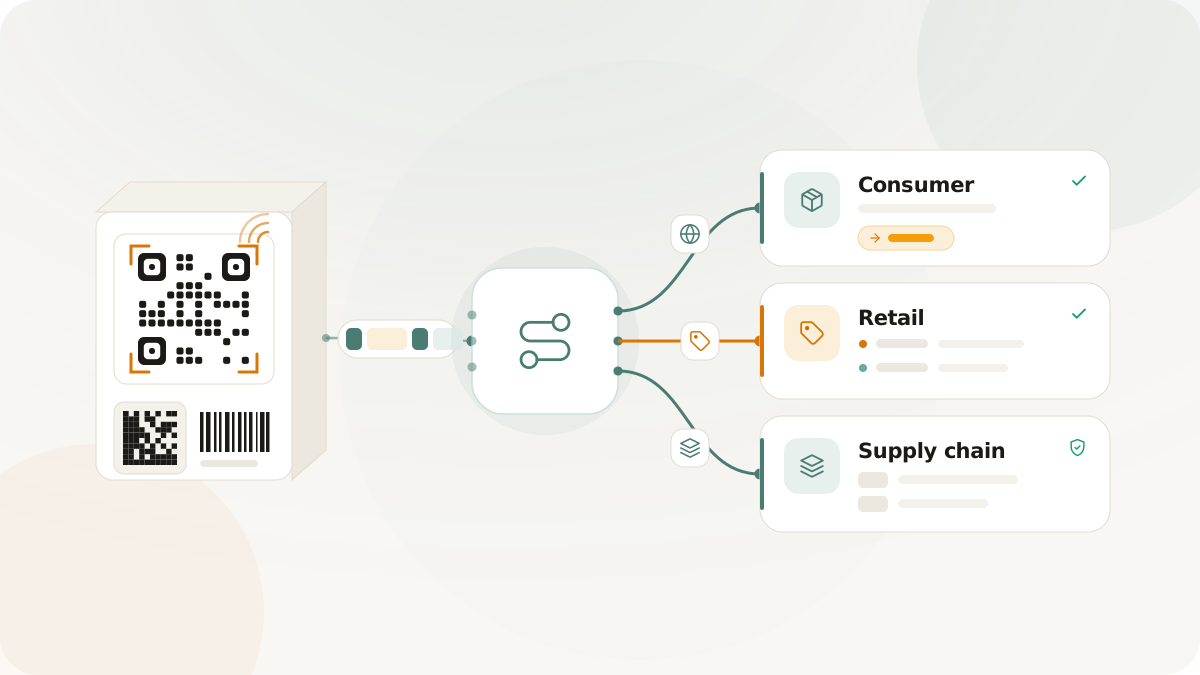
GS1 Digital Link brings product identifiers into a web URI format. For packaging teams, that means a 2D code can carry structured product identity while still resolving to digital destinations such as product information, consumer experiences, partner pages, retail/POS responses, linksets, or supply-chain resources.
This guide explains the basic concepts without treating Digital Link as a shortcut around product data governance, retailer review, or print testing. Customers remain responsible for GTIN ownership, product data accuracy, partner requirements, artwork approval, and testing with their own retail and scanner environments.
What GS1 Digital Link is
A GS1 Digital Link URI expresses GS1 identifiers in a web address. Instead of treating a package code as only a scanner payload, Digital Link lets the identifier live in a URI structure that can be resolved in different contexts.
At the simplest level, a Digital Link turns a product identity into a web-readable path. A product can have a GTIN, optional packaging or product variant details, batch or lot values, serial values, expiry dates, and other application identifiers. The Digital Link URI puts those values into a predictable structure so scanners, resolvers, and downstream systems can parse the product identity rather than reading an unstructured URL.
For example, a product record might produce a path that includes the GTIN application identifier (01) and an optional consumer product variant (22). Other workflows may also need batch or lot (10), serial (21), or expiry date (17) values. The exact identifier set depends on the product, packaging, partner requirements, and the system that will scan or resolve the code.
Why it matters for packaging
Traditional QR codes often encode a destination: a landing page, campaign URL, PDF, or support page. That works well for many marketing and support jobs, but product packaging often needs the code to carry identity as well as destination behavior.
GS1 Digital Link helps packaging teams keep those two ideas connected:
- Identity: the code can express product identifiers in a structure that systems can parse.
- Resolution: the same web URI can be served by a resolver that decides what response is appropriate for a scan context.
- Governance: the product record, packaging variant, Digital Link, resolver rules, generated assets, validation reports, and handoff files can be reviewed together.
- Future operations: resolver behavior can support consumer destinations, retail/POS responses, supply-chain responses, linksets, or fallback destinations without turning the product code into a disconnected image file.
The value is not just the QR image. The value is a repeatable product-backed workflow where the code, the source data, and the destination logic remain connected.
What it is not
GS1 Digital Link does not automatically mean a code will be accepted by every retailer or work in every point-of-sale and supply-chain system.
It also does not issue GTINs. A GTIN must come from the customer's GS1 membership, brand owner process, or approved product data source. Nimriz can help validate supported Digital Link structure and generate assets from product records, but the source data still belongs to the customer.
A validation report is also not the same thing as legal approval, retailer approval, scanner acceptance, or production sign-off. It can help teams catch structural errors and review warnings before handoff, but teams still need to confirm partner requirements, print size, placement, contrast, substrate, scanner path, and final artwork behavior.
The anatomy of a Digital Link workflow
A useful Digital Link workflow usually has more than one record behind it. Packaging teams should know what each layer is responsible for before they generate files.
Product record: the source identity context for the code. This can include the product name, brand, target market, GTIN, and the owner of the source data.
Packaging variant: the physical packaging context. A bottle label, box, carton, sleeve, multipack, or insert may need separate artwork versions, print status, and generated assets even when the underlying product is the same.
Digital Link: the canonical URI built from supported identifiers and qualifiers. This is the web-readable structure that can be encoded in a QR asset and resolved by the configured host.
Validation report: the review record for the generated Digital Link and asset settings. Errors should block handoff. Warnings should prompt review against source data, packaging requirements, or partner instructions.
Resolver rules: the routing and response logic for the Digital Link. Rules decide what happens when the URI is requested in a supported context.
Generated assets: the files that move into design, partner review, or production handoff, such as GS1 Digital Link QR and GS1 DataMatrix assets.
Export package: the handoff bundle. A ZIP export can include generated assets, a manifest, and validation report files so reviewers can understand what each file represents.
Common identifiers and qualifiers
The exact identifier set should come from the customer's product data and GS1 requirements, but several values appear frequently in packaging workflows.
01is the GTIN. It identifies the trade item and should come from the customer's approved source.22is a consumer product variant. It can help distinguish product variants where the GTIN alone is not enough for the intended workflow.10is batch or lot. This is useful when batch-level identity matters for operational or partner contexts.21is serial. This can support item-level identity when the product workflow requires it.17is expiry date inYYMMDDformat. This is relevant for products where expiry is part of the encoded operational context.
Not every package needs every value. Adding unnecessary qualifiers can make the code and workflow harder to review. The better starting point is to define what the scanner, retailer, partner, or internal system actually needs, then encode the supported identifiers that serve that job.
QR versus GS1 DataMatrix
GS1 Digital Link QR is useful when the code should encode a canonical HTTPS resolver URI. That makes it a natural fit for consumer-facing scans, web destinations, and contexts where a phone or web-aware scanner is expected to open a URL.
GS1 DataMatrix is common where compact encoded identifiers are needed on labels, packaging, or operational surfaces. It can be useful when a partner, scanner, or workflow expects a GS1 element string rather than a web URI.
The right format depends on the packaging context, available space, scanner environment, partner requirements, and the job of the code. A front-of-pack consumer experience, a warehouse label, and a retail/POS integration may have different expectations even when they refer to the same product.
Teams should validate the generated assets and test with the systems that will scan them. A code that works on a phone from a desktop monitor has not necessarily been tested for package glare, print substrate, curved surfaces, small sizes, retail scanners, POS software, or partner workflows.
Resolver rules
A resolver rule decides where a Digital Link should send a scanner or visitor in a given context. A consumer scan might redirect to a product information page, while a retail/POS context might need a configured JSON response, and a supply-chain context might need a different operational response.
In Nimriz Retail & GS1 workflows, supported resolver modes include:
- Consumer: redirect shoppers to a configured product, support, campaign, recycling, or brand destination.
- Retail/POS: return configured JSON for retail or point-of-sale use.
- Supply-chain: return configured JSON for supply-chain or operational use.
- Linkset: return linkset JSON for available links.
- Fallback: provide a default response when no more specific rule applies.
Resolver rules should be kept precise and reviewed before production use. A resolver is a routing control, not a guarantee that every external system will behave the same way. Teams should document the intended context, destination owner, fallback behavior, and any partner expectations before a code reaches print.
Validation before print
Validation is useful because packaging problems are expensive after production. A Digital Link can look plausible in a design file while still containing a malformed identifier, an unexpected qualifier, an unsafe resolver host, or asset settings that need review before printing.
A good validation step should answer practical questions:
- Is the GTIN normalized and valid for the expected format?
- Are supported qualifiers formatted correctly?
- Does the canonical URI match the intended product and packaging variant?
- Is the resolver host safe and expected?
- Are render settings conservative enough for packaging review?
- Are there errors that should block generation or handoff?
- Are there warnings that should be reviewed against source data or partner requirements?
Use errors as blockers before generating or printing assets. Treat warnings as review signals, especially when an input is valid but should be confirmed against a product data source, packaging requirement, retailer instruction, or partner workflow.
How packaging teams use Digital Link in practice
A practical workflow usually starts before any QR file is generated.
- Confirm the product data source, GTIN ownership, and owner for updates.
- Create the product record with brand, product name, target market, and GTIN.
- Add packaging variants for package size, format, artwork version, and print status.
- Build the Digital Link from the supported identifiers and qualifiers.
- Review the validation report and resolve any blocker errors.
- Configure resolver rules for consumer, retail/POS, supply-chain, linkset, or fallback behavior.
- Generate QR or GS1 DataMatrix assets from the validated records.
- Export selected files with the manifest and validation reports needed for handoff.
- Scan-test the final artwork on the physical package, proof, or label before production.
That sequence keeps product data, generated code assets, resolver destinations, and production handoff connected. It also makes it easier to answer basic review questions later: which product did this code represent, which artwork version used it, which validation report was reviewed, which resolver rules were active, and which files were handed to production?
Common mistakes to avoid
The most common Digital Link problems are workflow problems, not just code-generation problems.
- Treating a Digital Link QR as a generic marketing QR without confirming identifier ownership.
- Generating an asset before product data and packaging variant details are stable.
- Ignoring warnings because the code still renders.
- Documenting resolver behavior outside the system that serves the scan.
- Using a consumer destination when a retail/POS or supply-chain workflow expects structured data.
- Sending image files to production without validation reports, manifests, owner notes, or scan-test evidence.
- Assuming a validation report means a retailer, POS system, or partner scanner has accepted the code.
- Testing the preview instead of the final exported file in the final artwork.
A cleaner process does not remove the need for partner review or physical testing. It makes the review easier because the product record, generated asset, resolver behavior, and handoff evidence are easier to trace.
Nimriz workflow
Nimriz Retail & GS1 workflows support product records, packaging variants, Digital Link validation, QR and GS1 DataMatrix generation, resolver rules, validation reports, exports, and API access where entitled.
Use Nimriz when a team needs a product-backed packaging workflow rather than a single generated image. The dashboard flow helps operators create product and packaging records, validate Digital Links, generate assets, configure resolver behavior, and queue export packages. API access helps technical teams create repeatable product, packaging, validation, generated code, and resolver workflows on supported plans.
Nimriz keeps GS1 resolver activity separate from standard short-link QR analytics. Resolver activity uses privacy-safe identifiers and rollups rather than raw IP addresses or full User-Agent strings in Postgres, and GS1 resolver scans do not change standard short-link click or QR scan counters.
Start with Retail & GS1 QR codes for setup details, use the Retail & GS1 feature overview to understand the capability set, and use the Retail & GS1 use case for the product-backed packaging workflow.