
QR pages
Create structured QR pages for business profiles, menus, coupons, ratings, feedback, social hubs, and app-store routing.
QR pages
QR pages are structured, mobile-first pages that open when someone scans your QR code or taps your short link. Instead of jumping straight to another website, the QR opens a Nimriz-hosted page you control.
You can update the page content without reprinting the QR because the QR points to your branded Nimriz link. QR pages are not a freeform website builder. Each page type has focused fields so the page stays fast and clean on a phone.
Plan availability
| Plan | Included |
|---|---|
| Starter | 3 active hosted pages |
| Plus | 15 active hosted pages |
| Growth | 75 active hosted pages |
| Professional | 300 active hosted pages |
| Enterprise | 1,000 active hosted pages |
QR pages are available across plans within the workspace's shared hosted-page cap. Coupon redemptions, ratings, feedback, RSVPs, and gated lead submissions share the hosted-page response pool for the workspace. Lead capture gates and lead export remain available on Professional and Enterprise.
Page types
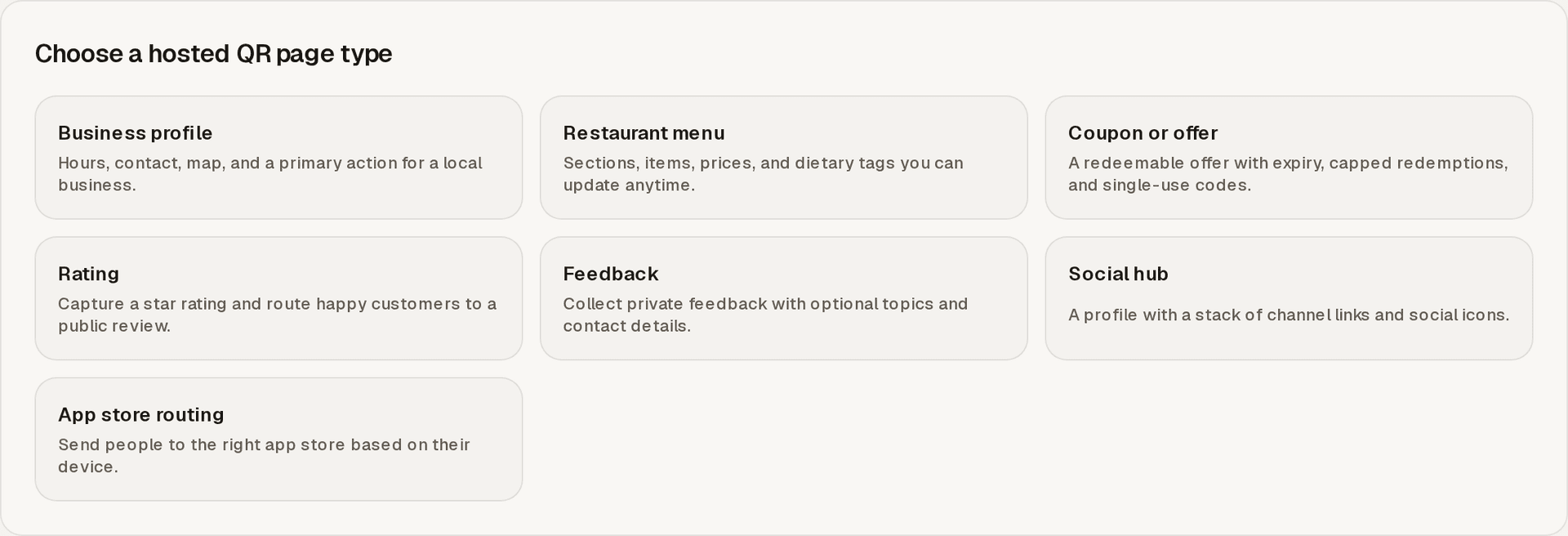
Business profile
Use a business profile page for storefront signs, reception areas, packaging inserts, or local service cards.
Business profiles can include a business name, tagline, description, category, logo, hours, optional open-now badge, phone, email, website, address, map link, primary CTA, secondary links, and social links.
Restaurant menu
Use a restaurant menu page for table tents, window signs, takeout flyers, and event catering menus.
Menus can include sections, item names, descriptions, prices, currency, dietary tags, availability, and featured dishes. You can update menu content without changing the QR code.
Coupon or offer
Use a coupon page for in-store promotions, packaging inserts, event offers, and local campaign cards.
Coupons can include an offer title, description, terms, expiry, active state, shared code or generated single-use codes, optional redemption cap, one redemption per visitor, and redemption history.
Redemption controls help reduce casual reuse. They are not a guarantee against every misuse.
Rating
Use a rating page to collect a quick star rating after a visit, delivery, appointment, or event.
Ratings can route happy customers to your public review link and ask lower-rated experiences for private feedback instead.
Feedback
Use a feedback page when you want private comments without sending people to a public review site.
Feedback pages can collect a topic, message, and optional contact details. When you collect contact details, add clear consent text.
Social hub
Use a social hub for creator signage, event posters, venue cards, and profile-led campaigns.
Social hubs can include a profile header, social icon row, ordered channel links, and link cards.
App store routing
Use app store routing when one QR should point people to the right app destination.
The page can present an iOS App Store URL, Google Play URL, and fallback web URL. Nimriz highlights the matching store for the visitor's device and keeps manual choices available.
Create and publish a QR page
- Open QR CodesQR Pages and choose Create QR page.
- Pick a page type.
- Choose the branded domain for its short link.
- Fill in the structured fields and pick a theme.
- Use the live preview to check the mobile layout.
- Choose Publish when you are ready, or Save draft to finish later.
Your QR code and short link are created for you. Use Pages to manage published page records after creation. Editing the page never changes the short link, so you can keep improving the page after the QR is printed or shared.
Responses and activity
Coupons are built around explicit redemption actions, not scan counts. The redemption history shows claims against the offer so your team can review use.
Ratings and feedback stay in your workspace. Nimriz does not post to external review sites for you, and it does not add these submissions to any third-party marketing tool.
QR page activity is recorded with privacy-safe hosted-page events. For QR scan traffic to the managed link, use QR Performance analytics where your plan includes it.
Privacy
QR pages follow the same privacy posture as the rest of Nimriz. Page activity is recorded with privacy-safe events, and abuse signals are stored as non-reversible values. Raw IP addresses and full device strings are never stored.
Related
- QR Codes dashboard for the signed-in QR Codes area.
- Static QR codes for fixed QR utility codes.
- Custom QR codes for link-backed QR styling and scan analytics.
- Exports for async export job behavior.
Related next steps
Follow setup and reference guides for Nimriz products and integrations.
Use structured hosted QR Pages when a printed code needs editable content, response capture, offers, social links, or app destinations.
Use this QR Pages checklist to review hosted page content, publishing state, QR destination, response collection, and scan testing before launch.
Ready to test this setup?
Create an account to try the workflow, or compare plans when the setup needs higher limits, integrations, or team controls.