
Integrations overview
How Nimriz uses destinations and actions to forward privacy-aware events to analytics tools, CDPs, and ad platforms.
Use destinations when you want Nimriz activity to reach the systems your team already uses for analytics, attribution, and downstream automation.
Most destinations run server-side and asynchronously. Nimriz captures the event, prepares a privacy-aware payload, and delivers it in the background so redirects stay fast.
Choose an integration path
- Browse all integrations to compare integration families and destinations.
- Explore automation for Zapier, Make, and n8n workflows.
- Connect AI tools through the Nimriz MCP server.
- Build with developer tools for APIs, authentication, webhooks, and custom implementations.
Destination model
Nimriz uses a CDP-style model with three layers:
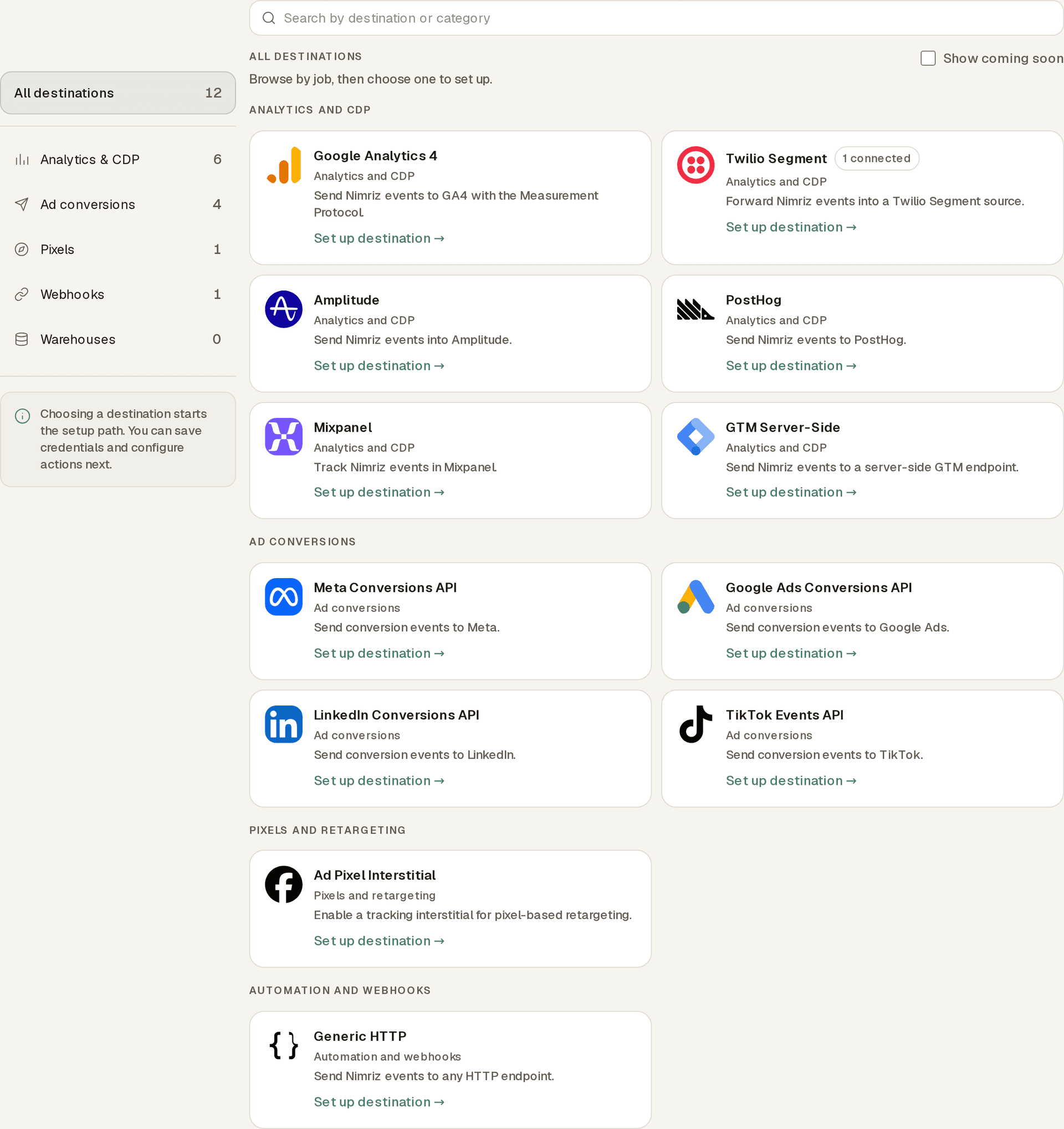
- Catalog: browse destinations by job, such as analytics and CDP, ad conversions, pixels and retargeting, CRM and sales, webhooks and custom HTTP, or warehouses and exports.
- Destination: configure one external destination with its credentials and workspace-level settings.
- Action: define what Nimriz should send to that destination, which events trigger it, how fields are mapped, and how it should be tested.
This lets one destination own more than one action. For example, you can send all click activity to one Segment action and keep a second action focused on conversions only.
What Nimriz can send
- Click, QR scan, card, and conversion events for analytics, CDP, and webhook-style destinations.
- Conversion events for supported ad platform conversion APIs.
- Client-side pixel fires through the tracking interstitial when a destination must run in the browser before redirect.
Destination categories
| Category | Typical destinations | Best for |
|---|---|---|
| Analytics and CDP | GA4, Segment, Amplitude, Mixpanel, PostHog, GTM Server-Side | Sending Nimriz events into analytics pipelines and downstream CDP workflows |
| Ad conversions | Meta, Google Ads, LinkedIn, TikTok | Sending server-side conversion events for attribution and optimization |
| Pixels and retargeting | Ad Pixel Interstitial | Firing a browser-side pixel before redirect with the tracking interstitial |
| CRM and sales | HubSpot, Customer.io, Klaviyo, Pipedrive, Attio | Sending identified conversion activity using a customer-supplied external ID |
| Webhooks and custom HTTP | Generic HTTP, Slack, Microsoft Teams, Discord | Sending events to custom endpoints and posting conversion or saved-contact alerts |
| Warehouses and exports | Google Sheets, Amazon S3, BigQuery, Airtable, Notion, Snowflake | Appending operational rows or delivering customer-owned analytics data |
The integrations catalog shows current destination status and setup paths. When a destination requires a provider test, Nimriz keeps it disabled until that test succeeds.
Setup flow
To set up a destination from the dashboard:
- Open Integrations in the dashboard.
- Start from IntegrationsDestinationsBrowse catalog and choose a destination.
- Walk through the guided setup steps: Connect, Filter events, Map fields, and Review.
- Review the disclosed provider-side effect before testing. A real alert, row, object, or provider event may be created.
- For credential-based alert, export, CRM, and lifecycle destinations, select Save, test, and enable. Nimriz saves the destination disabled, sends one real provider test, and enables it only when that test succeeds.
- For Google Sheets, HubSpot, Salesforce, Airtable, and Notion, select Save destination, open the saved destination, and select Connect provider.
- For Google Sheets, complete the destination fields shown. If Select spreadsheet appears after authorization, use it to choose one editable Google Sheet through Google Picker.
- After managed authorization and any required resource selection are healthy, select Send test event. A successful test unlocks the destination enable switch.
- A successful test must follow the latest stored credential, connector configuration, managed-authorization change, or required Google Sheets selection. Managed destinations also require currently healthy authorization.
- Open the destination detail page to add actions, adjust settings, reconnect a provider, or pause delivery later.
Mapping and filters
Each action can define:
- Event triggers such as clicks, QR scans, card activity, or conversions.
- Include and exclude filters for touch type, domains, spaces, tags, countries, and bot traffic.
- Field conditions such as
utm_source equals google. - Mapping rules such as rename, include, exclude, static values, and templates.
Delivery model
Background delivery
Named destinations receive events through Nimriz's async delivery pipeline. Connector work does not run on the redirect request itself.
Tracking interstitial
Some ad pixels must execute in the browser. For those cases, Nimriz can serve a short interstitial page that loads the configured pixel and then redirects the visitor to the final destination. This adds a brief delay before redirect and is best used only when browser-side tracking is required.
Privacy and data handling
Nimriz does not forward original IP addresses or complete User-Agent strings in canonical integration payloads. When a destination supports pseudonymous identity, standard privacy may include daily-salted hashed identifiers and redacted event context derived from the original click.
Strict privacy omits visitor hashes and selected granular fields such as city. Destinations use synthetic fallback identifiers only where required and supported. Archive-only fields, including sanitized referrer URL and external attribution identifiers, are not included in canonical integration events.
CRM and lifecycle destinations use a narrower identity contract. They receive only conversion events with a customer-supplied external_id. Nimriz resolves that value at dispatch time rather than adding it to the canonical integration event. Missing identity is suppressed safely, and internal subject IDs are never substituted.
You are responsible for confirming that each destination, vendor, event mapping, pixel, and conversion API has the right notice, legal basis, consent where required, and downstream vendor configuration for your campaign context.
Do not place personal data, secrets, access tokens, or sensitive data in destination URLs, short-link paths, UTM fields, custom query parameters, pixel settings, or conversion payloads unless you have an appropriate basis and understand downstream processing.
Plan availability
| Plan | Destination limit | Monthly event volume | Notes |
|---|---|---|---|
| Starter | 0 | 0 | Destinations are not included |
| Plus | 0 | 0 | Destinations are not included |
| Growth | 2 | 10,000 | Destination setup for supported connectors |
| Professional | 5 | 50,000 | Adds click-event webhooks, conversion events, and broader filtering and mapping controls |
| Enterprise | 10 | 500,000 | Highest published destination count and monthly event-volume caps |
Integrations vs webhooks
- Use destinations when you want Nimriz to format and deliver events to a destination for you.
- Use webhooks when you want signed lifecycle events delivered to your own backend.
- Use the tracking interstitial only when a browser-side pixel must fire before redirect.
Automation platforms
Nimriz has native apps for automation platforms that connect using workspace authentication and webhook infrastructure.
- Compare automation options before choosing a setup path.
- Zapier: Instant triggers for all event types, link actions, and search steps. Set up Zapier
- Make: Instant webhook triggers and link modules for scenario automation. Read the Make guide
- n8n: Community node with trigger and operations nodes. Set up n8n
These apps use the same event catalog as Nimriz's other integration paths, so the same event model works across automation apps, lifecycle webhooks, and outbound destinations.
Related guides
- Zapier
- Make
- n8n
- Meta Pixel & Conversions API
- Google Ads Conversions API
- LinkedIn Conversions API
- TikTok Events API
- PostHog Integration
- Mixpanel Integration
- GTM Server-Side Integration
- Slack alerts
- Microsoft Teams alerts
- Google Sheets export
- Amazon S3 export
- BigQuery streaming export
- HubSpot custom events
- Pipedrive conversion activities
- Attio conversion notes
- Airtable event export
- Notion event pages
- Discord alerts
- Snowflake event destination
- Customer.io events
- Klaviyo events
- Integration patterns
- Destinations API reference
Related next steps
Ready to test this setup?
Create an account to try the workflow, or compare plans when the setup needs higher limits, integrations, or team controls.