
Custom micro-pages
Create structured hosted pages with bounded blocks, branded short links, QR codes, and privacy-aware engagement analytics.
Custom micro-pages
Custom micro-pages let you publish a structured hosted page directly inside Nimriz. Each page gets its own branded short link and QR code, so you can share a polished public page without sending visitors to an external site builder or a generic landing-page tool.
Because the page is tied to a standard Nimriz short link, you can keep updating the content after you print or share the QR. The outward-facing share object stays the short link and QR, while the page itself is served on a Nimriz page URL.
Plan availability
| Plan | Included |
|---|---|
| Starter | 3 active hosted pages |
| Plus | 15 active hosted pages |
| Growth | 75 active hosted pages |
| Professional | 300 active hosted pages |
| Enterprise | 1,000 active hosted pages |
Custom micro-pages are available across plans within the workspace's shared hosted-page cap.
Before you start
Custom micro-pages work best when you prepare:
- A connected short-link domain in your workspace.
- The page title, short description, and the sequence of blocks you want to publish.
- Any images, PDFs, or video links you plan to embed.
- The link, CTA, or map destinations you want visitors to open from the page.
Each micro-page owns its own short link and QR code. Share the short link or QR instead of the raw page URL so the hosted page stays tied to Nimriz link analytics.
What a page can contain
Custom micro-pages use a bounded block model. Supported blocks are:
- Heading
- Text
- Image
- Button
- Map
- File
- Video
- Link card (richer button with thumbnail, title, and description)
- Image grid (2 or 3 column grid of 2 to 9 images, with optional click targets)
- Image carousel (side-scrolling row of 2 to 12 images)
- Contact (vCard-style block with optional "Save contact" download)
The page also has a structured Profile area at the top: avatar, display name, bio, and a curated social row. Profile is opt-in for document and event pages and on by default for new custom pages.
This keeps pages structured and mobile-friendly. Nimriz does not support arbitrary HTML blocks, drag-and-drop canvas layout, or multi-page site navigation in this feature.
Starting from a use case
When you click New page, the dashboard shows a Pick a starting point picker with five starters. Each card is a true preview of the finished page. Each starter pre-fills the page type, profile area, theme, and a few example blocks so you can edit instead of starting from a blank page.
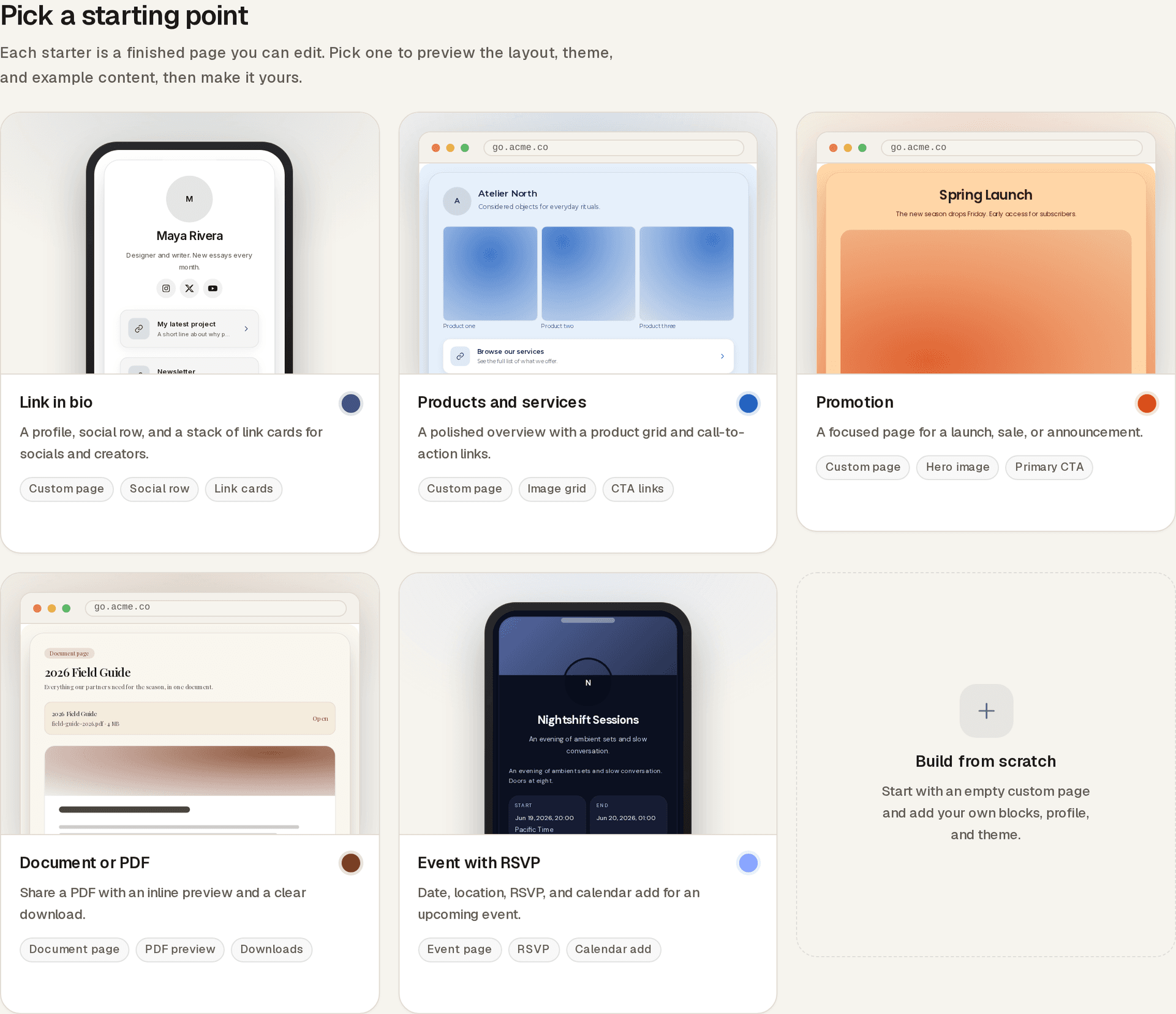
Selecting a starter opens a full preview of the published page so you can see the layout, theme, and example content before you commit. Choose Start with this starter to open the builder, or Back to starters to keep looking.
| Starter | Page type | What it pre-fills |
|---|---|---|
| Link in bio | Custom micro-page | Centered avatar profile, minimalist theme, three link cards. |
| Products and services | Custom micro-page | Avatar top-left profile, azure theme, an image grid plus two link cards. |
| Promotion | Custom micro-page | Title-only profile, sunset theme, hero image plus button plus link card. |
| Document or PDF | Document page | Editorial theme, profile off. The primary PDF you upload becomes the page content. |
| Event with RSVP | Event page | Banner-top profile, night-sky theme, RSVP turned on with one guest. |
You can also skip the starters and begin with an empty page using the Build from scratch tile, or by linking directly to /dashboard/pages/new?type=custom, ?type=document, or ?type=event.
While editing a page that started from a starter, a Change starter link at the top of the create flow takes you back to the picker.
Creating a page
The page editor splits into three tabs: Build, Design, and Track.
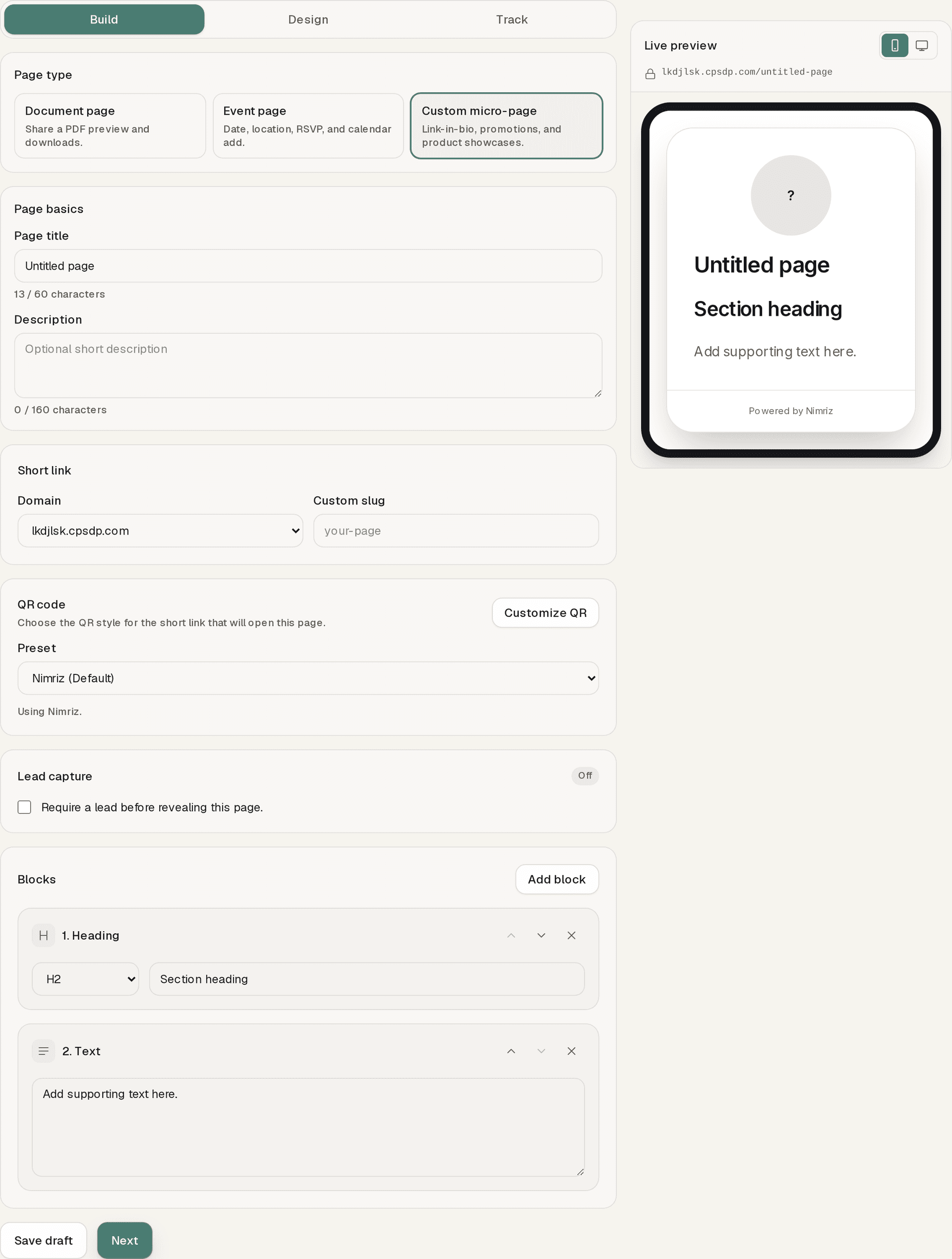
- Go to Pages in the sidebar.
- Click New page and either pick a starter or build from scratch.
- In Build, choose the Domain, optional custom slug, and QR preset for the short link that will own the page.
- Still in Build, add a Page title and optional description, then add blocks in the order you want them to appear. Use Save draft to keep progress at any time, or Next when you are ready to style the page.
- In Design, edit the Profile area (avatar, name, bio, layout, social row) and pick a theme preset, font, button shape, and colors. Use Back to return to Build, Save draft to keep progress, or Next to continue.
- In Track, review the analytics layout for page views, interactions, QR share, funnels, top actions, and supported metadata breakdowns. Analytics populate after the page is saved and published.
- On the Track step, use Save draft to finish later, or Save and publish to go live.
Page titles are capped at 60 characters. Page descriptions are capped at 160 characters so the public page stays compact on phones.
After creation, the page has:
- A branded short link
- A downloadable QR from the publish success modal and the linked short-link record
- A Nimriz-hosted public page URL
The short link remains the recommended share surface because it preserves standard Nimriz tracking and QR behavior.
Drafts, publishing, and sharing
- Draft lets you build the page structure before sending it anywhere.
- Published makes the page available from its short link and QR code, then shows a share modal with copy, QR download, and QR customization actions.
- Updating a published page does not require a new QR code. The same short link keeps working while you change blocks, theme colors, or assets.
This is especially useful for campaigns where print materials or offline placements already point to the QR.
Editing a page
Open Pages, then select the page you want to update. The editor includes:
- A Build tab with a structured block list, Add block, Move up, Move down, and Remove actions, QR preset selection, lead capture (custom and document pages), document files (document pages), and event details (event pages)
- A Design tab with the Profile editor, event hero image control, 6 named profile-area layouts, 8 named theme presets, background editor (solid, gradient, or image), title and description colors, a curated font list, button shape/fill/shadow controls, and block colors
- A Track tab with page views, interactions, funnels, top actions, and supported metadata breakdowns
- A live preview panel that uses the same render path as the public page
- Draft and publish controls
You can use Share page from the Pages list or editor to copy the branded short URL, share it to common apps, download the QR, or preview the public page. Use Customize QR when you want to jump straight into QR styling.
Profile, themes, and presets
Profile area
The Profile area sits at the top of the page above the body blocks. It supports:
- Square or circle avatar (uploaded image or initial fallback).
- Display name, capped at 80 characters.
- Bio, capped at 280 characters.
- 6 layout presets: centered avatar top, avatar top-left, banner top, compact inline, title only, and badge.
- Up to 12 social or contact links from a curated provider list (Instagram, Facebook, YouTube, TikTok, X, Threads, LinkedIn, GitHub, Pinterest, Reddit, Discord, Telegram, WhatsApp, Snapchat, Twitch, Mastodon, Spotify, Apple Music, SoundCloud, email, phone, website).
- A position toggle to render the social row above or below the body blocks.
- An icon style toggle: original, black, or white.
Each provider validates against its own URL pattern. Email and phone normalize to mailto: and tel: automatically.
Theme presets
8 named theme presets bundle background, title color, description color, font, button shape/fill/shadow, and block colors:
- Minimalist
- Editorial
- Sunset
- Ocean
- Night Sky
- Rose
- Azure
- Sleek
Apply a preset, then override individual fields if needed. Selecting a preset does not change the Profile or block content, only the design pose.
Backgrounds, fonts, and button styles
Backgrounds support solid color, two-color gradient (with four directions), or a self-hosted image with stretch, fit, or repeat behavior and a solid or gradient fallback. Fonts use a curated set of 28 Google Fonts, hosted via next/font so the public page does not introduce a third-party CDN call. Buttons support three shapes (rounded, soft, square), two fills (shaded, transparent), and three shadow levels (none, light, heavy).
Supported uploads
Images
Image blocks support uploads in:
- PNG
- JPEG
- WebP
Uploaded images are stored on Nimriz infrastructure and rendered directly on the public page.
Files
File blocks currently support:
The public page presents a download/open surface for the uploaded document. This keeps the first file-sharing slice strong for safe, predictable PDF delivery.
Public page behavior
The public page is:
- Standalone: no dashboard navigation or account UI
- Mobile-friendly: optimized for QR scans and short-link visits
- No login required: anyone with the link or QR can view it
Pages always show the Nimriz footer in this version.
Lead capture
Professional and Enterprise workspaces can place a lead capture gate before the page content. The gate can require one or more of name, email, phone, and company, then reveal the page after a successful submit.
See Lead capture gates for setup, export, and troubleshooting details.
Block behavior
| Block | Behavior |
|---|---|
| Heading | Adds a section heading in the page flow. |
| Text | Displays paragraph-style copy with preserved line breaks. |
| Image | Shows an uploaded or linked image with optional alt text and caption. |
| Button | Opens an external URL in a new tab. |
| Map | Opens a map/location URL in a new tab. |
| File | Opens or downloads the uploaded PDF. |
| Video | Embeds supported video links when possible and always provides an open-video link. |
| Link card | A richer link block with optional thumbnail, headline, description, and a single click target. |
| Image grid | A 2 or 3 column grid of 2 to 9 images, each optionally linked to its own URL. |
| Image carousel | A side-scrolling track of 2 to 12 images, each optionally linked to its own URL. |
| Contact | A vCard-style block with name, pronouns, job title, company, up to 8 contact methods, and an optional "Save contact" .vcf download. The block has three display modes: on page, card, and reveal-on-button. |
Event pages accept only the existing structured event content plus image_grid and image_carousel as supplemental media. link_card and contact_block are not allowed on event pages.
Analytics
Custom micro-pages keep Nimriz's two-layer tracking model:
Redirect-layer analytics
When someone clicks the short link or scans the QR, Nimriz records the normal short-link event, including QR scans as qr_scan.
Page engagement analytics
Once the visitor reaches the hosted page, Nimriz records page-specific engagement such as:
hosted_page_viewedpage_button_clickedfile_downloadedmap_openedvideo_link_openedlink_card_clicked(taps on Link card blocks)profile_social_clicked(taps on Profile social row entries)media_cell_clicked(taps on individual cells in image grid or carousel blocks)
These events remain tied back to the owning short link. You can review them in the page's Track tab, AnalyticsPages, Realtime, and the owning link's hosted-page summary. IP addresses are handled with Nimriz's privacy-aware analytics pipeline rather than stored raw.
Managing and deleting pages
The Pages list shows all hosted pages in the workspace, along with:
- Page title
- Publication status
- Owning short link
- Quick actions for preview, edit, share, and delete
Deleting a custom micro-page also removes the short link that belongs to that page. If you want to keep the short link, edit the page instead of deleting it.
Troubleshooting
I cannot publish the page
- Confirm the page has a title and at least the content you want visitors to see first.
- Confirm the workspace has at least one connected domain.
- Remove any incomplete blocks with empty URLs or missing uploaded files, then try again.
An uploaded image or PDF is not appearing
- Re-upload the asset and confirm the upload finished before saving.
- File blocks support PDFs only in this version.
- If the file was uploaded in another format, replace it with a PDF or move that content into another block type.
A video does not embed on the public page
Some providers or link formats only support the fallback open-video action. Nimriz still keeps the outbound link available even when a full inline embed is not possible.
I want to collect leads before the page content
Lead capture is available on Professional and Enterprise plans. Turn it on in the page editor, choose the required fields, and review the gate behavior in the dedicated lead-capture guide.
Related guides
Related next steps
Ready to test this setup?
Create an account to try the workflow, or compare plans when the setup needs higher limits, integrations, or team controls.