
Audit logs
What actions are recorded, how to search and filter the audit log, and how to export it.
What audit logs record
Nimriz keeps a persistent audit log of security-relevant actions taken across your workspace and organization. Audit logs are designed for governance, compliance review, and security investigations-they answer "who did what, when, and from where."
Audit logs are immutable. Entries cannot be edited or deleted. Once an action is recorded, it stays in the log for the duration of the retention period.
Where to find audit logs
Workspace audit log
Every workspace Admin can access the workspace audit log from the Audit entry in the Workspace section of Settings (SettingsAudit).
This view shows actions scoped to your current workspace. It covers link management, team changes, domain events, API key operations, webhook events, and more.
Workspace audit logs are available on eligible plans (Professional and above by default); on lower plans the page reports that audit logs are not enabled for the workspace.
Organization audit log
Organization Owners and Org Admins can access the organization-level audit log from the Audit entry in the Organization section of Settings (SettingsOrganizationAudit).
This view spans all workspaces within the organization and can be narrowed to a single workspace with the Workspace filter. It includes cross-workspace governance actions, org membership changes, billing events, and domain lifecycle events at the org level.
What each log entry contains
Every audit log entry records the following:
| Field | Description |
|---|---|
| Date & Time | When the action occurred (stored in UTC, displayed in your local format). |
| Event | The specific action that happened (see the action catalog below). |
| Actor | Who performed the action: a user (identified by display name and email), an API key or partner app (for API- and MCP-originated actions), an admin operator, or a system process. |
| Target (entity type) | The type of resource affected (e.g., url, domain, profile, invite). |
| Entity ID | The stable UUID of the affected resource. |
| Source | Where the request originated: dashboard, api, import, webhook, mcp, admin, or system. |
| Workspace | The workspace context for the action. |
| Organization | The org context, when relevant. |
| Metadata | Action-specific details (e.g., before/after values for changes, field names changed). |
Action catalog
The catalog below lists the most common actions by their raw identifiers; it is representative, not exhaustive. The dashboard displays friendly labels derived from these identifiers (for example, space.updated appears as "Space Updated"); raw identifiers appear in CSV exports.
Link actions
| Action | What it records |
|---|---|
link.created | A new short link was created. Records domain, slug, destination host, and creation source. |
link.deleted | A short link was permanently deleted. Records domain and slug. |
link.destination_updated | The destination URL of a link was changed. Records before/after destination values. |
link.destination_rolled_back | A link's destination was rolled back to an earlier state from its destination history. |
link.slug_updated | The slug was changed. Records old and new slug values. |
link.expiration_updated | The expiration date was set, changed, or removed. |
link.password_updated | Password protection was added, changed, or removed. |
link.routing_rule_created | A routing rule was added to a link. |
link.routing_rule_updated | A routing rule was modified. |
link.routing_rule_deleted | A routing rule was removed. |
link.routing_rule_reordered | The ordering of routing rules was changed. |
link.qr_style_updated | A link's custom QR styling was changed. |
link.organization_updated | A link's space, tags, or library organization was changed. |
link.import_batch_processed | A bulk link import completed. Records how the batch was processed. |
Team and member actions
| Action | What it records |
|---|---|
team.invite_created | A workspace invitation was created and sent. Records invited email and assigned role. |
team.invite_resent | An invitation was resent. |
team.invite_revoked | An invitation was revoked before acceptance. |
team.invite_accepted | An invitation was accepted and the invitee joined the workspace. |
team.member_role_updated | A member's role was changed. Records old and new role. |
team.member_removed | A member was removed from the workspace. |
workspace.active_switched | A user switched their active workspace. Records before/after workspace. |
Domain actions
| Action | What it records |
|---|---|
domain.created | A custom domain was added. |
domain.verification_updated | The domain's verification or readiness state changed. |
domain.landing_redirects_updated | The domain's fallback landing redirects were changed. |
domain.reconnected | A domain was reconnected after a disruption. |
domain.disconnected | A domain was disconnected or removed. |
Security and authentication actions
| Action | What it records |
|---|---|
account.workspace_2fa_enforcement_updated | Workspace 2FA enforcement was enabled or disabled. |
user_totp.enrolled | A user completed TOTP setup. |
user_totp.disabled | A user disabled their TOTP factor. |
user_totp.recovery_codes_regenerated | A user regenerated their recovery codes. |
user_totp.recovery_code_used | A user signed in with a recovery code. |
user_totp.support_reset | An operator reset a user's TOTP factor via the support admin flow. |
API and integration actions
| Action | What it records |
|---|---|
workspace_api_key.created | A workspace API key was generated. |
workspace_api_key.revoked | A workspace API key was revoked. |
conversion_callback_secret.rotated | The workspace Conversion API signing secret was generated or rotated. |
conversion_callback_secret.revealed | The current Conversion API signing secret was revealed in the dashboard. |
webhook_endpoint.created | A webhook endpoint was added. |
webhook_endpoint.updated | A webhook endpoint configuration was changed. |
webhook_endpoint.deleted | A webhook endpoint was removed. |
webhook_endpoint.secret_rotated | A webhook endpoint's signing secret was rotated. |
webhook_endpoint.test_sent | A test event was sent to a webhook endpoint. |
webhook_delivery.replayed | A past webhook delivery was manually replayed. |
integration_destination.created / updated / deleted | An integration destination was added, changed, or removed. |
Library and organization actions
| Action | What it records |
|---|---|
space.created | A space was created. |
space.updated | A space was renamed or modified. |
space.deleted | A space was deleted. |
tag.created | A tag was created. |
tag.updated | A tag was renamed or modified. |
tag.deleted | A tag was deleted. |
utm_preset.created | A UTM preset was created. |
utm_preset.updated | A UTM preset was modified. |
utm_preset.deleted | A UTM preset was deleted. |
utm_preset.duplicated | A UTM preset was duplicated. |
qr_preset.created | A QR preset was created. |
qr_preset.updated | A QR preset was modified. |
qr_preset.duplicated | A QR preset was duplicated. |
qr_preset.deleted | A QR preset was deleted. |
Searching and filtering
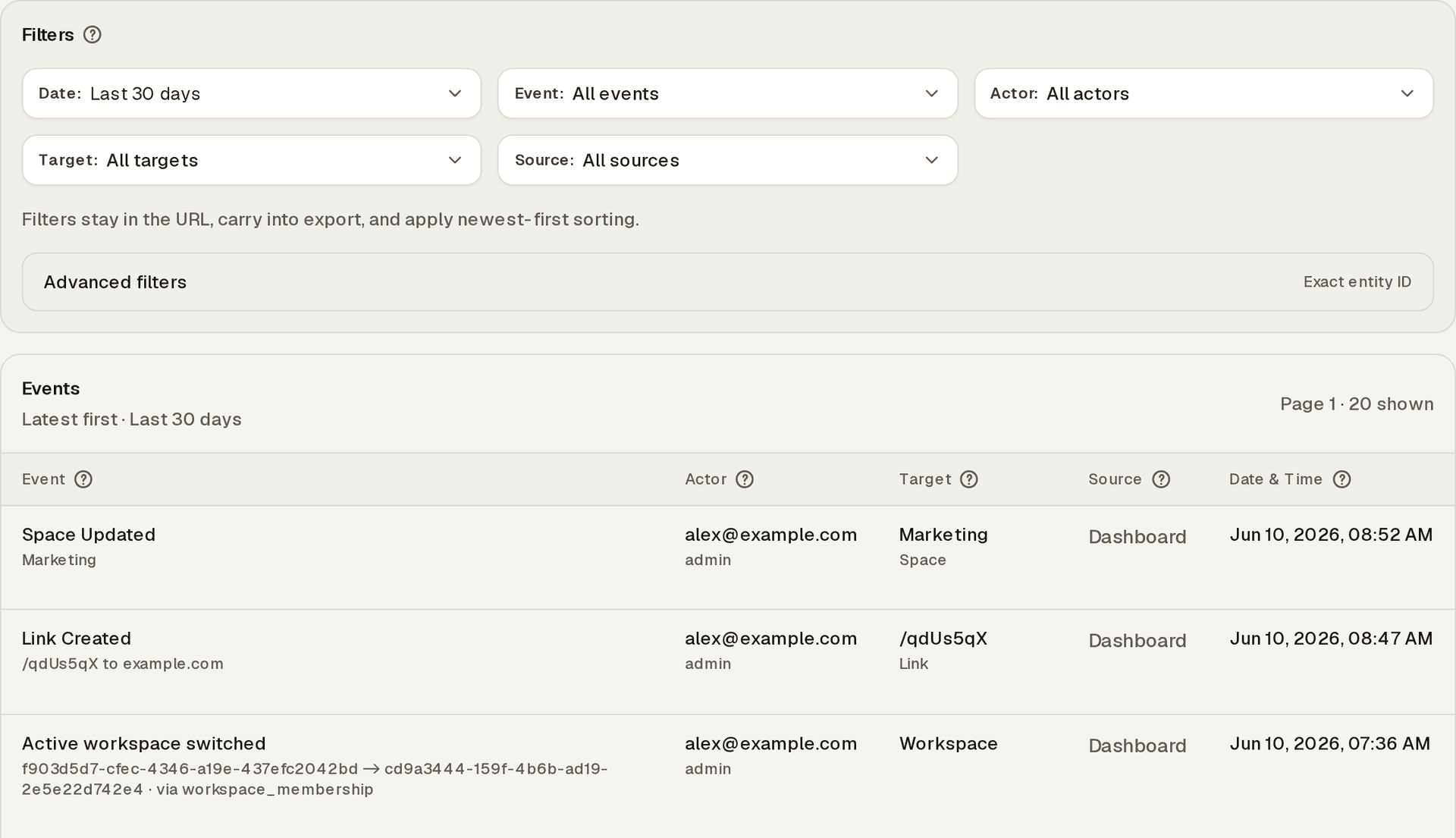
From the audit log view's Filters panel, you can filter entries by:
- Date range-narrow to a specific period.
- Event-filter to a specific action.
- Actor-filter to actions by a specific user.
- Target-the entity type: see only link (
url) events, team events, domain events, etc. - Source-where the request originated (dashboard, API, import, webhook, MCP, admin, system).
- Entity ID-look up every event that touched one specific resource.
- Workspace-organization view only: narrow to one workspace.
Active filters appear as removable chips, stay in the URL (so investigations are shareable), and carry into exports. For complex investigations, use multiple filters together. For example: all link events by a specific user in the last 7 days.
Exporting audit logs
The audit log can be exported as a CSV with the Export CSV action on the audit page. The export respects the same scope and filters as the on-screen view and covers the most recent matching entries (up to 500 rows per export).
The underlying endpoints (GET /api/audit-logs and GET /api/organization/audit-logs, with query parameters such as action, entity_type, user_id, source, from, to, page, limit, and format=csv) are dashboard endpoints authenticated by your signed-in session and role-they do not accept workspace API keys.
Audit log retention
Audit log retention follows the platform's standard data retention schedule. Logs are preserved for as long as the workspace is active. Logs cannot be selectively deleted.
What is not recorded
Audit logs focus on intentional mutations and security-relevant events. The following are not recorded:
- Routine read operations (viewing a link's analytics, browsing the link list).
- Redirect events (individual short-link clicks are in analytics, not in audit logs).
- No-op saves (an edit that results in no actual change does not create an audit entry).
Troubleshooting
I cannot see the Audit section in Settings
Audit log access requires the Admin role in the workspace (or Org Owner/Org Admin for org-level logs). If you do not see the Audit entry in Settings, ask your workspace Admin to check your current role. Workspace audit logs are also plan-gated (Professional and above by default)-on lower plans the page reports that audit logs are not enabled.
An action I took is not appearing in the audit log
- Check the time range filter-the log defaults to a recent window, and your action may be outside the visible range.
- Confirm you are looking at the correct scope. Workspace-level audit shows workspace actions; organization-level audit shows org-level actions.
- Some actions (read operations, no-op saves) are intentionally not logged.
I want to see who changed or disabled a link
Links are not hard-deleted in Nimriz; they are disabled, expired, or taken down. Filter the audit log with Target set to Link (the url entity type) and look for the relevant lifecycle event (for example link.expiration_updated or link.takedown_updated), or paste the link's ID into the Exact entity ID advanced filter to see its full history.
Related guides
Related next steps
Ready to test this setup?
Create an account to try the workflow, or compare plans when the setup needs higher limits, integrations, or team controls.