
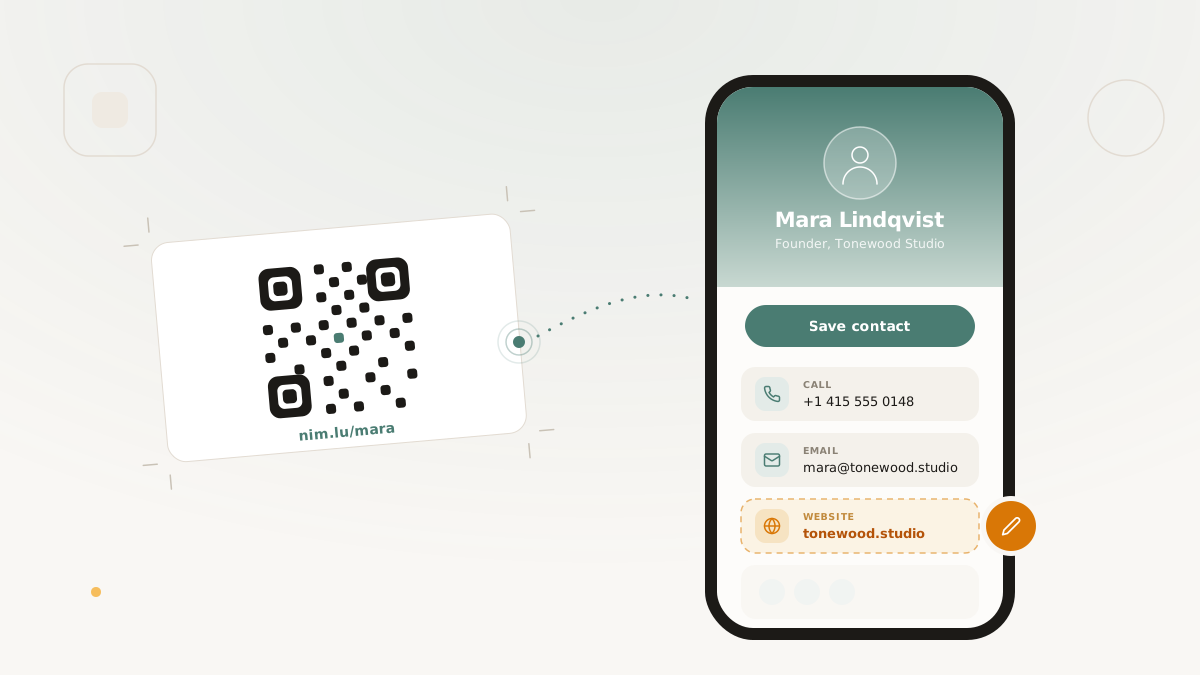
Paper business cards still solve one important job: they let you hand someone a quick reminder that you exist. The problem is everything that happens after that.
Phone numbers change. Job titles change. Calendar links change. Websites get redesigned. A printed card turns stale the moment any of those details move, which is why so many teams end up reprinting cards or living with outdated contact details in circulation.
Digital business cards solve that problem by turning the "card" into a hosted profile that can be updated after it has been shared. When the card is powered by a branded short link, QR code, and phone-wallet actions, the workflow gets even stronger: the URL stays clean, the QR stays scannable, and the underlying contact page can evolve without forcing a reprint.
Why digital cards work better than static paper
The real advantage is not novelty. It is editability.
With a digital business card:
- the short link stays the same
- the QR code stays the same
- the contact details behind it can change whenever they need to
That matters in practical situations:
- a rep changes roles after conference season
- a founder updates the primary call to action from "Book a demo" to "Join waitlist"
- a consultant changes phone number or email
- a team wants to refresh brand styling without reprinting hundreds of cards
The printed object becomes a stable access point, not a frozen source of truth.
What the recipient experience should feel like
A good digital card should not feel like "a website with some contact details on it." It should feel like a fast, mobile-first contact handoff.
That means:
- clear identity at the top
- one-tap save contact behavior
- Apple Wallet and Google Wallet actions when recipients prefer a wallet pass
- simple phone, email, and website actions
- optional social links
- a branded primary action when the card is part of a broader funnel
This is what makes digital cards useful at events, sales meetings, field marketing, and creator networking. The scan moment is quick, and the follow-up action is even quicker.
Why branded links and QR matter here
If the card is tied to a generic destination or a third-party link, it loses some of the trust and control that make the format useful in the first place.
Using a branded short link changes that:
- the card URL is easier to share verbally or on slides
- the QR code points to a brand-owned address rather than a generic shortener
- the team can keep all card traffic inside the same reporting and governance model as the rest of its campaign links
That makes the card feel like part of the same system as your other branded link surfaces, not a separate one-off tool.
Where digital cards fit best
Digital business cards are most useful when the point of contact is fast but the downstream relationship matters.
Common examples:
- conferences and trade shows
- networking events
- on-site retail or field teams
- partner meetings
- creator and speaker profiles
- sales and solutions engineering introductions
The format is especially strong when the same person needs to share contact details in both physical and digital contexts.
A better operating model for teams
The team benefit is easy to miss if you only think about the recipient.
Digital cards give teams a cleaner operating model because:
- contact details are editable after distribution
- QR assets can be reused across signage and print
- the link and QR sit inside the same account and plan structure as the rest of the product
- the sharing surface can inherit the same branded-domain posture as other public links
For organizations that care about brand consistency, that is a major upgrade over having dozens of employees using unrelated tools to create ad hoc profile pages.
The practical takeaway
The next business card does not need to be "paper or digital." It can be both:
- a printed object for the handoff
- a branded short link for memorability
- a QR code for fast mobile capture
- a wallet pass for easy access later
- a hosted digital card for everything that changes later
That is a better system than expecting a piece of paper to stay accurate forever.
Further reading
You hand someone your business card at a conference. They take it, glance at it, put it in a pocket or bag, and by the time they get home, it is buried under a stack of 30 other cards. Maybe they scan it into a contacts app. Maybe they lose it. Maybe they file it in a drawer where it joins hundreds of others in permanent obscurity. The traditional business card is a one-shot, untraceable interaction with a low conversion rate.
A digital business card built on a QR code changes the mechanics entirely. The card is a hosted page - a branded virtual card with your name, title, contact information, social links, and a primary CTA. A QR code on your physical card (or shared directly as a link) takes the recipient straight to this page, where they can save your contact to their phone with a single tap. You know when they viewed it, whether they saved your contact, and which of your links they clicked. And if you change jobs, phone numbers, or titles, you update the card once and every QR code ever printed still points to the current version.
Why digital over paper
The practical advantages of a digital business card are straightforward:
Editable after print. A paper business card is frozen the moment it leaves the printer. If your phone number changes, your title changes, or you switch companies, every card in circulation is wrong. A digital card behind a short link can be updated at any time. The QR code printed on your physical card resolves to whatever the current version of the digital card shows.
Never goes stale. Paper cards get lost, damaged, or discarded. A digital card lives at a persistent URL. The recipient can bookmark it, revisit it months later, or share it with a colleague by forwarding the link. The card remains accessible as long as you keep it active.
Analytics on every interaction. A paper card has zero feedback. A digital card tracks page views, contact saves, phone taps, email taps, and link clicks. You know who engaged and how, which is information a paper card can never provide.
Richer than paper allows. A physical business card is constrained by physical space - name, title, company, phone, email, and maybe a website URL. A digital card can include social profiles, a bio, a profile photo, multiple CTAs, and links to your portfolio, calendar, or LinkedIn. The QR code on the physical card is the gateway to all of it.
How virtual cards work
A virtual business card in Nimriz is a hosted page purpose-built for personal contact sharing. It combines three elements:
The hosted page. A branded page displaying your identity, contact information, social links, and a primary CTA. The page renders on your workspace's custom domain, so the URL is something like links.yourcompany.com/jane rather than a generic third-party service URL.
The short link. The hosted page is accessible through a branded short link that is clean, memorable, and shareable via text, email, or social bios.
The QR code. A QR code pointing to the short link, ready to print on a physical business card, badge, or any other surface. Scan the code and the recipient lands on your virtual card.
Creating your card
The card creation workflow includes several groups of information:
Identity fields
Your name, title, and company. These are the headline elements that identify who you are. The name and title display prominently at the top of the card page.
Contact information
Phone number and email address. These render as tappable actions on the card - the recipient taps the phone number to call, taps the email to compose a message. Each tap is tracked as an analytics event, so you know which contacts engage beyond just viewing the card.
Social links
Links to your professional profiles - LinkedIn, Twitter/X, GitHub, personal website, or any other URL. These display as recognizable social icons on the card. For many professionals, social profiles are the real point of a business card exchange - the recipient wants to connect on LinkedIn, not call your office phone.
Primary CTA
A customizable call-to-action button on the card. This is the single most important action you want the recipient to take. Examples:
- "Book a meeting" linking to your Calendly or scheduling page
- "View portfolio" linking to your work samples
- "Visit website" linking to your company site
- "Download resume" linking to a document page
The primary CTA is the conversion action of your business card. A paper card has no equivalent - it passively displays information and hopes the recipient takes action. A digital card actively prompts the action you want.
Contact save with .vcf
The core utility of a digital business card is the one-tap contact save. When a recipient taps the save contact action on your virtual card, their phone downloads a .vcf (vCard) file containing your name, title, company, phone, email, and other contact fields. The phone's contacts app opens with the card pre-filled, and the recipient taps "Save" to add you to their contacts.
This is dramatically more reliable than the paper card workflow. With a paper card, the recipient has to manually type your name, number, and email into their phone - a process that introduces typos and that many people defer indefinitely. With a .vcf download, the information transfers perfectly in seconds.
The save_contact event is tracked in analytics, so you know exactly how many people who viewed your card actually saved your contact. This is the truest measure of business card effectiveness.
Templates and appearance
Nimriz offers three card templates:
Default. A clean, professional layout with your photo, identity fields, contact actions, social links, and CTA arranged in a standard vertical format. Works for any industry and any context. If you are unsure, use this.
Minimal. A stripped-down layout that emphasizes whitespace and typography. Fewer visual elements, more focus on the essential information. Good for personal brands, creative professionals, and anyone who wants a card that feels understated.
Bold. A high-contrast layout with stronger visual hierarchy and more prominent CTA placement. Good for sales professionals, founders, and anyone who wants the card to make an immediate impression.
Premium template customization - custom color schemes, layout adjustments, and advanced branding - is available on Growth plans and above. The base templates are available on Plus plans.
CTA analytics
Every interaction on a virtual business card is tracked as a distinct event type:
- card_view - the card page was opened
- save_contact - the .vcf file was downloaded
- call_tap - the phone number was tapped
- email_tap - the email address was tapped
- social_click - a social profile link was clicked
- cta_click - the primary CTA button was clicked
- link_click - any other link on the card was clicked
These events give you a complete picture of how people interact with your card. Over time, patterns emerge: if most viewers tap your LinkedIn but few save your contact, that tells you something about how your network prefers to connect. If your CTA has a high click rate, you know the action you chose resonates.
For sales teams distributing cards at conferences, the analytics aggregate across all cards issued by the team. A manager can see total card views, saves, and CTA clicks across the team for a given event or time period.
Use cases
Conferences and trade shows
The primary use case for digital business cards. Print a simple physical card with your name, title, and a QR code. Every exchange becomes a trackable interaction, and recipients can save your details or add the card to a phone wallet. After the conference, review your card analytics to see who engaged and prioritize follow-up accordingly.
Sales meetings
Share your card link at the end of a meeting or in a follow-up email. The recipient gets your full contact information plus a direct link to schedule a follow-up. The CTA analytics tell you whether they took the next step.
Team cards
Equip an entire sales or customer success team with digital business cards on a consistent template. Each team member gets their own card with individual information, all using the company's branded domain and visual identity. This creates a uniform professional presence while giving each person their own trackable card.
Social bios
Your digital card URL works as a link-in-bio for professional social profiles. Add links.yourcompany.com/jane to your LinkedIn, Twitter/X, or email signature. Anyone who clicks gets your full professional card with all contact options and your primary CTA.
Plan availability
Virtual business cards are available on Plus plans and above. The base card functionality - identity fields, contact info, social links, CTA, .vcf save, wallet actions, and the three standard templates - is included at the Plus tier.
Premium card features - advanced appearance customization, additional template options, and enhanced branding - are available on Growth plans and above.
For teams, card management and aggregate analytics are available at the Growth tier, with API access for programmatic card creation at the Professional tier.
Getting started
The quickest path to a working digital business card:
- Create a virtual card page with your name, title, and contact information
- Add your most important social links
- Set a primary CTA that drives the action you care about most
- Generate a QR code for the card link with a "Save my contact" CTA layout
- Enable Apple Wallet or Google Wallet actions if your workspace has wallet providers configured
- Print the QR code on your physical business card, or add the link to your email signature and social bios
- After your next event or meeting, check the analytics to see who viewed, saved, added to wallet, and clicked
The card pays for itself the first time someone saves your contact from a QR scan instead of losing your paper card in a coat pocket.
- QR CTA layouts - adding call-to-action layouts for more scans
- QR code sizing: what actually works - sizing your QR for business cards
- Offline-to-online growth - the broader physical-to-digital strategy