
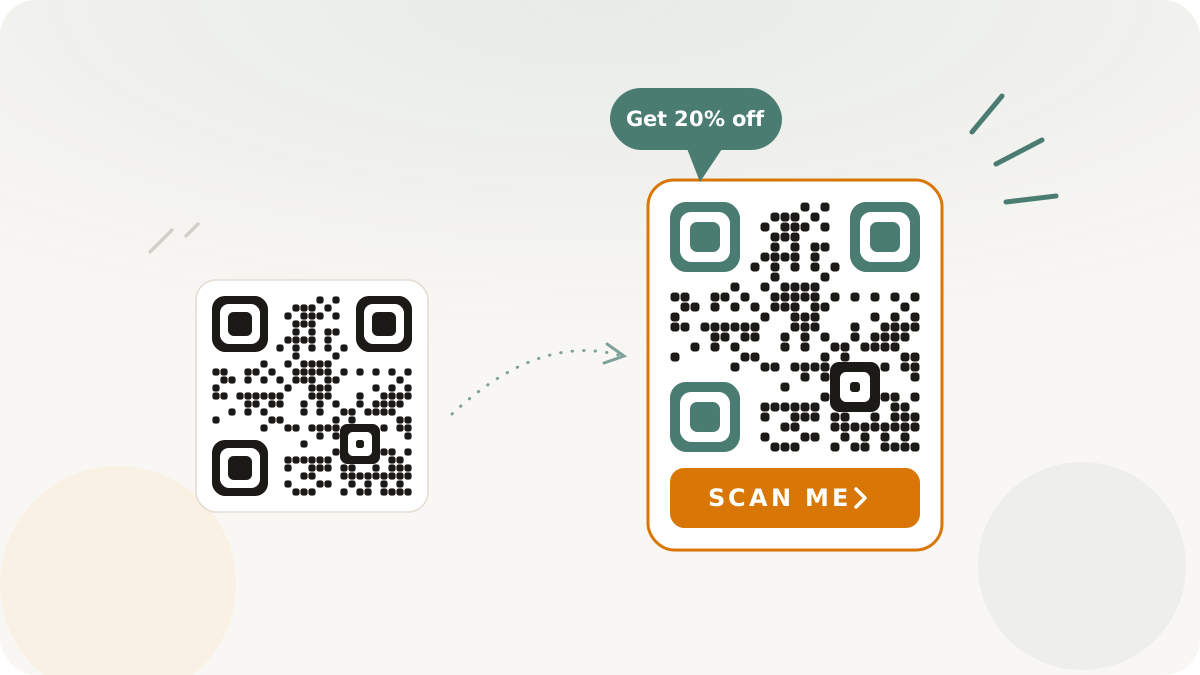
You paid for the design, the print run, and the placement. The posters went up, the packaging shipped, the business cards got handed out. And the scans barely registered. The problem is almost never the QR code itself. It is that a bare black-and-white square tells a passerby nothing about what happens after they scan, so they do not bother. You bought attention and then gave people no reason to act on it.
A QR code is a door with no sign. People walking past a poster, glancing at a product insert, or pocketing a card have no reason to pull out their phone unless something tells them why. The sign is a call to action: a short line of context wrapped around the code. This is a playbook for adding that prompt so the placements you already paid for actually convert into scans.
Why bare codes underperform
A naked QR code asks for an unusual amount of trust and effort with zero payoff promised. Unlock the phone, open the camera, hold it steady, wait, and discover... what? The reader does not know, so most do not start. Every silent code on a flyer is a small ask with no stated reward.
The fix is not a flashier code. It is telling people, in a few words, what they get. A code that says "Scan for the menu" or "Get 20% off" gives a reason to act that an identical bare code does not. You can measure the difference yourself: run the same placement with a prompt and without, and compare the scan counts.
The one rule: say what they get
Everything else is detail. The job of the frame is to answer one question before the reader has to think: what happens when I scan this?
In Nimriz, a CTA layout renders outside the QR matrix, not on top of it. That distinction matters, because it means the prompt adds context without eating into the scannable area or the code's error correction. You get the marketing benefit of a clear ask with no cost to reliability. The exported asset bundles the code, its quiet zone, and the CTA into one image ready for print or screen. The full set of layouts and the styling options are in the custom QR codes docs.
Pick the frame for the placement
You do not choose a frame by its name, you choose it by where the code is going. Three scenarios cover most of what you will print, and you can carry one launch campaign across all three.
- Tight print, where space is scarce (business cards, packaging inserts, small labels): use a compact frame that adds a short caption or label without bulking up the asset. The code stays the hero; the line underneath just gives the reason.
- General marketing, where you have room (flyers, brochures, posters, handouts): use a frame with a stronger, more visible prompt, like a callout or labeled strip. There is space for the CTA to be read from a step or two away.
- Hero placements, where the code is the main event (conference signage, window clings, standalone displays): use a larger, panel-style frame so the CTA reads across a room and the whole thing looks intentional rather than tacked on.
Same campaign, three surfaces, three frames, each matched to how far away the reader is and how much room you have.
Write CTA copy that converts
Keep the text to one short line, and make that line about the outcome, not the mechanism. "Scan here" tells the reader nothing; "Scan for the menu" tells them exactly what they get.
Lines that work share two traits, specific and short:
- "Scan for menu"
- "Get 20% off"
- "Download the guide"
- "Save my contact"
- "Claim your free trial"
Lines that waste the space do the opposite: "Scan here" (for what?), "QR code" (obvious and useless), "Visit our website for more information" (too long, too vague). A reader decides whether to scan in about two seconds, so the copy has to land inside that window. Nimriz keeps the text to a single line and previews the exact rendered result before you export, so you see how it fits before it goes to print. The character budget and preview behavior are detailed in the custom QR codes docs.
Do not break the scan
A frame is only worth it if the code still scans every time. A short checklist:
- Keep the prompt outside the code. Nimriz handles this for you: the CTA never overlaps the finder patterns or data, so your error correction is untouched.
- Protect the quiet zone. The blank border around the code is how scanners find it. The renderer preserves it between the code and the frame, so do not crop the exported asset tight to the edges.
- Hold the contrast. Dark code on a light background, or the reverse. Avoid similar shades, especially for codes shown outdoors or in dim venues.
- Test on a real phone before the run. Scan the final downloaded asset with a standard camera app, on both iOS and Android, before printing anything in volume.
What you get back
You get more scans from placements you already paid for, without buying more print, more space, or more reach, just by giving people a reason to act. Because Nimriz tags QR-origin traffic separately from regular clicks, you can watch scan counts move and build a sense of which prompts and placements earn their keep for your audience. Measure it directly: scans per placement, before the CTA and after.
Add a frame to your next code with the custom QR codes docs. For getting the physical size and scan distance right, see QR code sizing, and for the wider print-to-digital playbook, see offline-to-online growth.