
QR codes are everywhere again. They are on restaurant tables, product packaging, conference badges, direct mail pieces, event signage, billboard ads, and TV commercials. The resurgence is real and the use cases are compelling - but a QR code that fails to scan is worse than no QR code at all. It creates confusion, signals poor execution, and loses you the conversion the campaign was designed to drive.
This guide covers everything that affects QR code scannability: size rules for different contexts, contrast and quiet zone requirements, the mathematics of error correction levels, the reality of logo overlays, and how the URL length you encode directly affects the code's physical characteristics.
Why QR codes fail to scan
Before prescribing sizes, it is worth understanding the failure modes. QR codes fail for a predictable set of reasons:
Too small at the scanning distance. The reader (phone camera) needs to resolve the individual black and white modules (the small squares that make up the QR pattern). If the code is printed at a size where the camera cannot distinguish individual modules at the expected viewing distance, decoding fails.
Insufficient contrast. Light gray on white, or dark gray on black, does not give the camera enough signal to threshold the modules cleanly. High contrast - ideally black on white - is the most reliable combination.
Missing or cropped quiet zone. The quiet zone is the white border around the QR code pattern. It is not decorative. The QR decoder looks for the quiet zone to identify the boundary of the code. Crop the quiet zone and the decoder may fail to locate the code at all, or may misread its boundaries.
Encoding a URL that is too long. The longer the URL, the more data modules the QR code contains, and the denser the pattern. A dense pattern requires higher printing precision and larger physical size to remain scannable.
Logo overlay without appropriate error correction. Logos placed in the center of a QR code obscure the pattern. Without a high enough error correction level, the decoder cannot reconstruct the missing data.
Physical damage or distortion. On packaging that gets wet, creased, or partially obscured, error correction is what keeps the code working. Appropriate error correction level selection is your buffer against real-world conditions.
Size rules by context and scanning distance
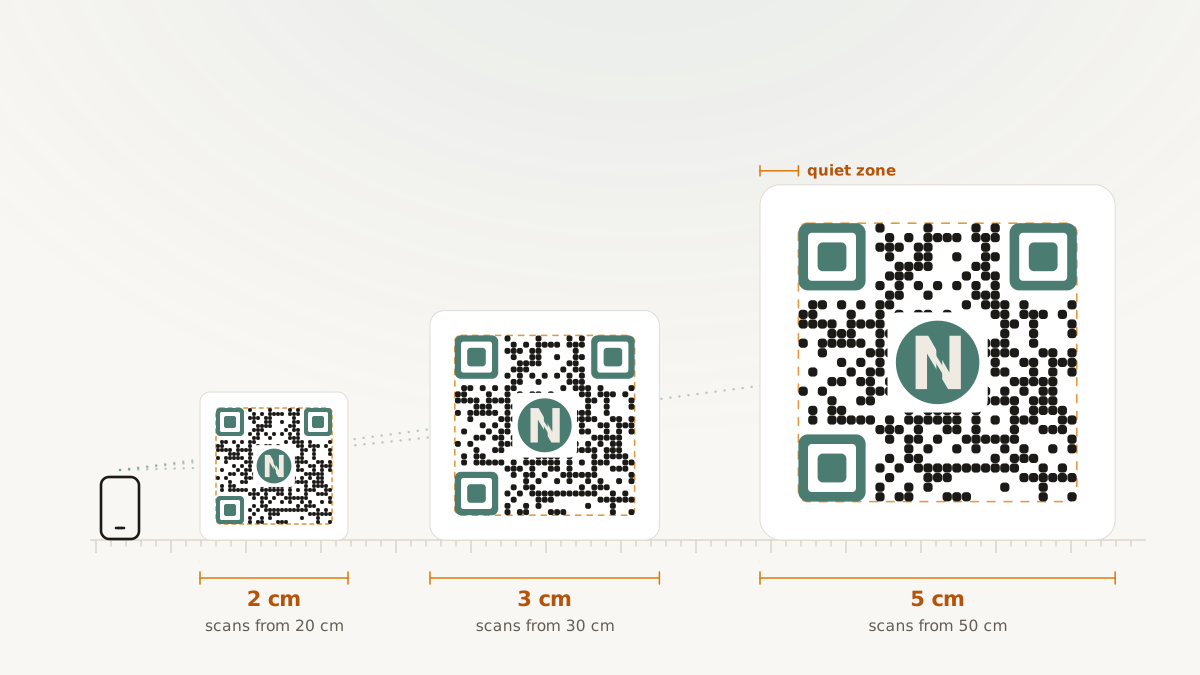
The minimum physical size is directly tied to scanning distance: the farther away a person scans from, the larger the code needs to be. Here are practical targets organized by context:
Business cards - scanning at roughly 15–20 cm. This is the closest common scanning scenario. A code of 2 cm × 2 cm can work, but 2.5 cm × 2.5 cm gives more margin. At this size, you are limited to simple URLs - if the encoded data is long, the code becomes too dense to reliably scan at that physical size.
Flyers and insert cards - scanning at 20–30 cm. Target 2.5 cm × 2.5 cm minimum, with 3 cm × 3 cm preferred. The larger the flyer, the less cramped the layout; there is rarely a reason to use the minimum here.
Signage at table height (menus, counter cards) - scanning at 30–60 cm. Target 4–6 cm. Many menu QR codes fail because they are printed at business-card scale but used at arm's-length distance.
Event stands and posters - scanning at 1–3 m. This is where sizing becomes genuinely important. A code scanned from 1 m should be at least 7–10 cm. A code on a banner that will be scanned from 2 m should be 15–20 cm or larger.
Billboards and large-format outdoor - scanning at 5+ m. At this scale, the code needs to be very large (30 cm or more). However, encoding a short, simple URL matters more here than anywhere else - a dense code at large format still fails if the module pattern is too complex for the camera to resolve at distance.
[Suggested visual: Diagram showing a person scanning from different distances with corresponding minimum QR code dimensions.]
The quiet zone: non-negotiable margin
The quiet zone is a minimum of four modules of white space on all sides of the QR code pattern. In practical terms this means the border between the QR code and any surrounding artwork or text must be visually clear.
The most common failure point is placing the QR code flush against a design element - a product image, a text block, a colored background that bleeds to the edge. Decoders look for the quiet zone as a locator. Without it, they either fail to find the code or misidentify its boundaries.
Minimum quiet zone rule: four modules on every side. For most codes this translates to a visible white margin of at least 3–5 mm at typical print sizes.
[Suggested visual: Side-by-side showing a QR code with proper quiet zone versus one clipped tightly against design elements, with arrows indicating the difference.]
Error correction levels explained
Error correction is the mechanism that allows QR codes to be partially obscured or damaged while still decoding successfully. There are four levels, each trading code density for recovery capability:
| Level | Recovery capacity | Typical use case |
|---|---|---|
| L (Low) | ~7% of modules can be damaged or covered | Maximum data capacity, clean print, no logo, controlled environment |
| M (Medium) | ~15% | General purpose, good for most marketing use cases without logos |
| Q (Quartile) | ~25% | Small logo overlays, codes on textured or slightly damaged surfaces |
| H (High) | ~30% | Larger logo overlays, harsh environments, printed on materials that may get wet or creased |
The trade-off is density. Higher error correction stores more redundant data, which requires more modules, which makes the code denser. A denser code either needs to be printed larger (to keep individual modules distinguishable) or will be more sensitive to printing quality.
For most marketing applications - branded QR codes on flyers, packaging, and events - Level M is the right default. It provides reasonable recovery without making the code noticeably denser. If you are adding a logo, move to Level Q or H.
Logo overlays: making them work safely
Placing a brand logo in the center of a QR code is aesthetically appealing and has become a standard practice in branded marketing materials. It works reliably when done correctly, and fails silently when done incorrectly.
The mechanics: a logo in the center covers QR code modules. The decoder uses error correction to reconstruct the covered data. If the logo covers more of the pattern than the error correction level can recover, the code fails.
Rules for safe logo overlays:
- Use error correction level Q or H.
- Limit the logo to no more than 20% of the code area. At H-level error correction you have up to 30% recovery capacity, but staying under 20% gives you margin for real-world imprecision.
- Ensure the logo has a white background behind it (not transparent) so it masks the modules cleanly. A transparent logo over the QR pattern confuses the decoder.
- Test on real hardware - iPhone and Android camera apps, and two or three third-party QR scanner apps. What works in a desktop QR decoder preview does not always translate to a real-world scan.
- Validate the final exported PNG or SVG, not the preview rendering in design software. Software previews sometimes interpolate or scale code elements in ways that differ from the actual print output.
How URL length affects the code
The QR code specification encodes data in a pattern of modules. More data requires more modules. More modules mean a denser pattern.
A 25-character URL (links.yourbrand.com/promo) produces a significantly simpler, less dense code than a 150-character URL with five UTM parameters appended. For the same physical print size, the simpler code scans more reliably, especially in suboptimal conditions like low light, slight camera movement, or aging print materials.
This is a concrete, practical reason to use branded short links for QR campaigns. You encode the clean, short URL into the QR code, and the UTM parameters live on the destination URL at the redirect level - they do not need to be encoded into the QR pattern itself.
Practical comparison:
- Long URL encoded in QR:
https://yourbrand.com/collections/summer?utm_source=packaging&utm_medium=print&utm_campaign=summer_2026&utm_content=insert_card- complex, dense, failure-prone at small print sizes. - Short URL encoded in QR:
links.yourbrand.com/summer26- clean, minimal pattern, reliable scan at smaller sizes.
Nimriz QR code notes
Nimriz generates QR codes using your short URL. The QR vs. direct click distinction is handled via a reserved query marker that Nimriz appends at redirect time - this classification happens server-side and is not visible in the encoded URL or forwarded to your destination. Your destination URLs receive clean traffic.
Generated QR assets can be exported as PNG or SVG for print production. Validate on real hardware before finalizing for print. Details are in Custom QR codes and Analytics definitions.
Pre-flight checklist before printing
Before sending a QR code to print production:
- Confirm the short URL resolves correctly in a browser.
- Confirm the destination URL is correct and UTM parameters are intact.
- Scan the QR code with at least two different phones (one iPhone, one Android).
- Check quiet zone is visible on all four sides.
- Verify contrast is sufficient - print a test page at production size, not just check on screen.
- If a logo is included, confirm the code scans with the logo in place, not just in the version without it.
- Test at the actual expected scanning distance in realistic lighting conditions.