
Webhook delivery and retries
Manage endpoints, verify signed deliveries, handle retries, replay events, and full event schemas.
Prerequisites
- A Nimriz plan with webhook access.
- A secure HTTPS endpoint on your server that can receive JSON POST requests.
- A mechanism in your backend to verify HMAC-SHA256 signatures.
What webhooks deliver
Nimriz webhooks send signed HTTP POST requests to your endpoint whenever specific business events occur in your workspace. Each delivery contains a structured JSON payload describing the event.
Webhooks v1 covers lifecycle events: changes to links and domains. They are not per-click event streams.
Looking for click or conversion event streaming? If you need to forward click-level or conversion data to external platforms, see our Integrations overview, which includes high-volume click webhooks and destination-specific delivery options.
Event catalog
| Event type | When it is emitted |
|---|---|
link.created | A new short link was successfully created in your workspace. |
link.updated | A link was mutated (destination change, slug change, expiration change, password change, routing rule change). |
link.deleted | A link was permanently deleted from your workspace. |
link.takedown_updated | A moderation or safety workflow changed a link's availability (e.g., active → disabled, or a restore). |
domain.verification_updated | A domain's verification or readiness state changed. |
Events fire regardless of where the change came from: a link created in the dashboard, over the API, or through the MCP server emits the same link.created event.
Managing webhook endpoints
When managing webhooks through the API, read routes require webhooks:read; create, update, delete, test-send, replay, and secret rotation require webhooks:write.
Adding an endpoint
- Go to IntegrationsDeveloperWebhooks in the dashboard.
- In the Create endpoint panel, enter a name and your endpoint URL (must be HTTPS).
- Tick the event types you want under Subscriptions (at least one).
- Click Create endpoint.
Endpoint URLs cannot use userinfo and cannot point at localhost, private network addresses, link-local addresses, metadata endpoints, or obvious internal hostnames. If your endpoint redirects, Nimriz follows only redirects whose target passes the same safety checks.
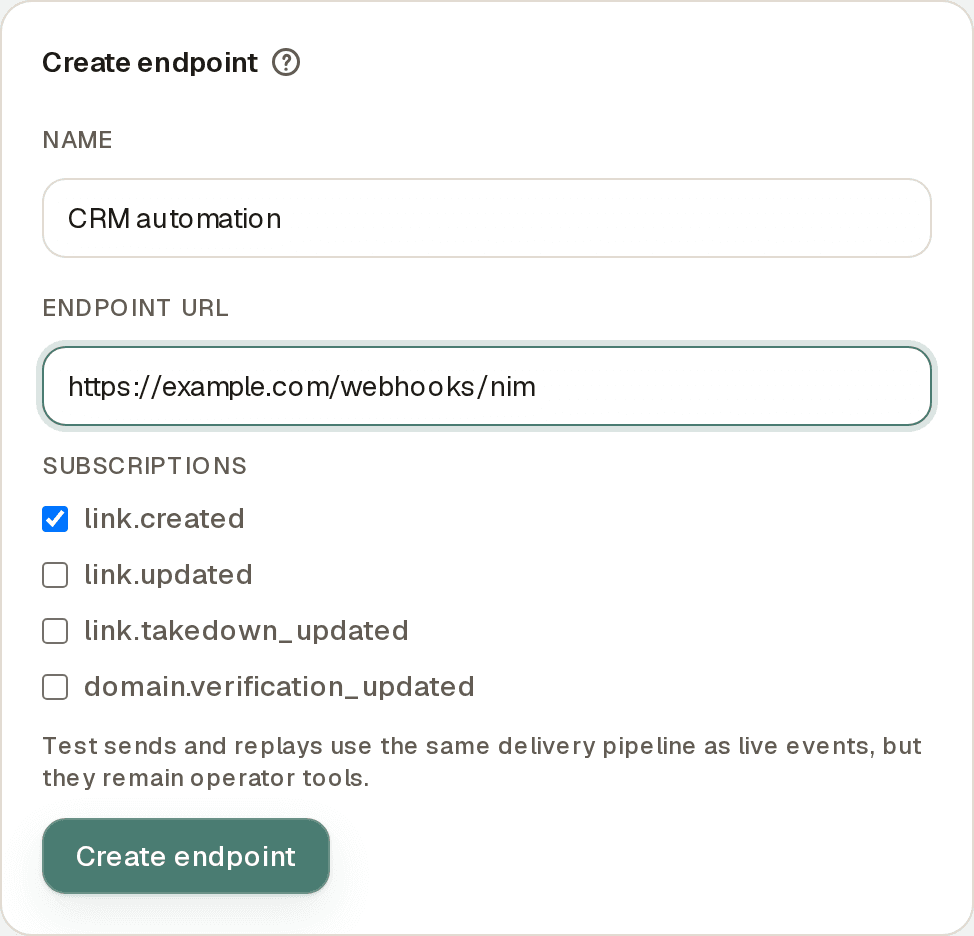
Nimriz generates a unique signing secret for the endpoint. Copy and store it securely-it is shown only once. You need it to verify incoming requests.
Editing an endpoint
Each configured endpoint appears as a card under Configured endpoints. Directly on the card you can:
- Update the name and endpoint URL.
- Change which event types are subscribed.
- Switch the Status between Active and Disabled without deleting the endpoint.
Click Save on the card to apply your changes.
Disabling and re-enabling
Setting an endpoint's status to Disabled pauses delivery without deleting the endpoint configuration or its delivery history. Nimriz will not attempt delivery to a disabled endpoint. Set it back to Active to resume delivery.
Deleting an endpoint
Deleting an endpoint permanently removes it and stops all future deliveries. Past deliveries can remain visible in the Delivery history table while they are still among the recent entries.
Rotating the signing secret
If your signing secret is compromised:
- Find the endpoint's card under Configured endpoints.
- Click Rotate secret.
- A new secret is generated and shown once. Copy it immediately.
- Update your backend to use the new secret.
During rotation: The old secret becomes invalid immediately. Update your backend before rotating, or accept a brief gap in signature verification during the switchover.
Event envelope
Every payload uses a consistent envelope structure:
{
  "id": "9f4d5dbd-c8b8-4c89-a080-b4f70fce8f53",
  "type": "link.updated",
  "api_version": "2026-03-30",
  "created_at": "2026-03-17T12:34:56.789Z",
  "organization_id": "org-uuid",
  "workspace_id": "workspace-uuid",
  "data": {
    "...event-specific payload..."
  }
}
| Field | Description |
|---|---|
id | Stable event ID. The same id is used across all delivery attempts for the same event, and on replay. Use this for deduplication. |
type | The event type string (e.g., link.updated). |
api_version | Date-based contract marker. Payload interpretation changes are released under a new api_version. |
created_at | When the event was created-not when it was delivered. |
organization_id | Your org's UUID (when known). |
workspace_id | Your workspace's UUID. |
data | Event-specific payload. Uses stable resource IDs (url_id, domain_id). |
Event-specific payloads
link.created
{
  "url_id": "url-uuid",
  "domain_id": "domain-uuid",
  "domain_name": "go.example.com",
  "short_code": "launch24",
  "short_url": "https://go.example.com/launch24",
  "status": "active",
  "redirect_status_code": 302,
  "expires_at": null,
  "password_protected": false,
  "destination_host": "example.com",
  "destination_url_capped": "https://example.com/landing",
  "source": "dashboard",
  "actor": {
    "user_id": "user-uuid"
  }
}
link.updated
{
  "url_id": "url-uuid",
  "domain_id": "domain-uuid",
  "domain_name": "go.example.com",
  "event_action": "destination_updated",
  "changed_fields": ["destination"],
  "before": {
    "destination_host": "example.com",
    "destination_url_capped": "https://example.com/landing"
  },
  "after": {
    "destination_host": "example.org",
    "destination_url_capped": "https://example.org/new-path"
  },
  "source": "api",
  "actor": {
    "user_id": "user-uuid"
  }
}
The changed_fields array lists which fields changed. The before and after objects contain safe field snapshots for those changes.
Note: Full raw destination URLs (including query strings) are intentionally omitted from webhook payloads. Only destination_host and a capped version of the URL are included to prevent leaking query-sensitive or signed URL parameters.
link.deleted
{
  "url_id": "url-uuid",
  "domain_id": "domain-uuid",
  "domain_name": "go.example.com",
  "short_code": "launch24",
  "short_url": "https://go.example.com/launch24",
  "status": "active",
  "destination_host": "example.com",
  "destination_url_capped": "https://example.com/landing",
  "deleted_at": "2026-06-19T10:15:00.000Z",
  "source": "dashboard",
  "actor": {
    "user_id": "user-uuid"
  }
}
link.takedown_updated
{
  "url_id": "url-uuid",
  "domain_id": "domain-uuid",
  "short_code": "launch24",
  "before_status": "active",
  "after_status": "disabled",
  "source": "admin"
}
domain.verification_updated
{
  "domain_id": "domain-uuid",
  "domain_name": "go.example.com",
  "before": {
    "is_verified": false,
    "verification_status": "pending",
    "ready_for_traffic": false
  },
  "after": {
    "is_verified": true,
    "verification_status": "verified",
    "ready_for_traffic": true
  },
  "source": "dashboard",
  "actor": {
    "user_id": "user-uuid"
  }
}
Signed request headers
Every POST delivery includes these headers:
| Header | Description |
|---|---|
X-Nim-Event-Id | The stable event ID (same as id in the envelope). |
X-Nim-Event-Type | The event type string. |
X-Nim-Timestamp | Delivery timestamp in Unix seconds. |
X-Nim-Signature | v1=<hex hmac sha256>. |
X-Nim-Delivery-Attempt | Attempt number for this endpoint and event. |
X-Nim-Delivery-Reason | live, replay, or test. |
Verifying signatures
Always verify the signature before processing a webhook payload. Sign the raw request body bytes (not re-serialized JSON) against your endpoint's signing secret.
import crypto from 'node:crypto';

export function verifyNimWebhook({ secret, timestamp, rawBody, signatureHeader }) {
  const expected = `v1=${crypto
    .createHmac('sha256', secret)
    .update(`${timestamp}.${rawBody}`)
    .digest('hex')}`;

  return crypto.timingSafeEqual(
    Buffer.from(expected),
    Buffer.from(signatureHeader ?? '')
  );
}

// Usage (Express example)
app.post('/webhooks/nimriz', express.raw({ type: 'application/json' }), (req, res) => {
  const isValid = verifyNimWebhook({
    secret: process.env.NIMRIZ_WEBHOOK_SECRET,
    timestamp: req.headers['x-nim-timestamp'],
    rawBody: req.body.toString('utf-8'),  // must be raw bytes, not parsed JSON
    signatureHeader: req.headers['x-nim-signature'],
  });

  if (!isValid) {
    return res.status(401).send('Invalid signature');
  }

  const event = JSON.parse(req.body);
  // process event...
  res.status(200).send('OK');
});
Critical: Parse the body as raw bytes first, verify the signature, then parse as JSON. If you let your framework parse the body as JSON first, the byte-level content may differ from what Nimriz signed.
Delivery semantics
At-least-once delivery
Nimriz delivers each event at least once. Your endpoint may receive the same event more than once (due to retries or replays). Your processing must be idempotent-handle duplicates by checking the event id.
Retry schedule
If your endpoint does not return a 2xx response, Nimriz retries:
| Attempt | Delay |
|---|---|
| 1 (initial) | Immediate |
| 2 | 60 seconds |
| 3 | 120 seconds |
| 4 | 240 seconds |
| 5 | 480 seconds |
| 6 | 900 seconds |
After 6 attempts, the delivery moves to dead-letter state. It will not retry further unless you manually replay it.

Retryable outcomes: Network failures, no response, HTTP 408, 409, 425, 429, and all 5xx responses.
Non-retryable outcomes: Any other non-2xx response (e.g., 400, 401, 403, 404) causes immediate terminal failure for that attempt.
Event ordering
Nimriz does not guarantee global delivery order. Two events for the same link may arrive in any order. Build your receiver to handle out-of-order events-use the created_at timestamp and the before/after field snapshots to reason about state transitions correctly.
Test delivery
Send a test event to your endpoint without triggering a real product event:
- Go to IntegrationsDeveloperWebhooks in the dashboard.
- Find the endpoint's card under Configured endpoints.
- Click Send test.
A nim.webhook.test event with a synthetic payload is sent to your endpoint. The X-Nim-Delivery-Reason header will be test. This is useful for verifying your endpoint is reachable and your signature verification is working.
Delivery history and replay
Viewing delivery history
The Delivery history table on the Webhooks page shows recent deliveries across your endpoints. For each delivery, you can see:
- Event type and timestamp.
- The target endpoint.
- Delivery status and attempt count.
- The HTTP response code from your server's latest attempt.
- Whether it was a live delivery, replay, or test.
- The error message if delivery failed.
Replaying an event
If a delivery failed and you need to reprocess it:
- Find the failed delivery in the Delivery history table.
- Click Replay.
Nimriz re-delivers the original event envelope (same id, type, data) with a fresh timestamp and signature. The X-Nim-Delivery-Reason header will be replay.
Important: A replay is a duplicate delivery from your server's perspective. Your processing must be idempotent. Deduplication is based on the event id.
Troubleshooting
Signature verification is failing
- Confirm you are reading the raw request body bytes before verifying, not after JSON parsing.
- Confirm you are using the correct signing secret for this endpoint. Each endpoint has its own secret.
- If you recently rotated the secret, ensure your backend is using the new secret.
- Confirm
X-Nim-Timestampis the correct value in your signature input string:${X-Nim-Timestamp}.${rawBody}.
Receiving duplicate events
This is expected. Implement idempotent processing using the event id as the deduplication key. Check whether you have already processed an event with that id before executing any side effects.
Events arriving out of order
Do not rely on arrival order. Use the created_at timestamp in the envelope to determine the correct chronological order. For state-change events (link.updated), use the before and after field snapshots instead of tracking state on your side.
Endpoint is failing and not retrying
Check the delivery history for the specific error. If your endpoint is returning a non-retryable status code (e.g., 400, 404), Nimriz stops retrying immediately. Fix the issue and use Replay to reprocess the failed delivery.
All deliveries are in dead-letter state
Your endpoint was unreachable or consistently failing across all 6 retry attempts. Fix your endpoint, make sure its Status is Active, then use the Replay action on the failed deliveries.
The delivery history is missing older events
The Delivery history table shows recent deliveries only, so older deliveries fall off the list as new ones arrive.
Related guides
Related next steps
Follow setup and reference guides for Nimriz products and integrations.
Review supported events, field mapping, setup docs, privacy notes, and plan fit for the Webhooks integration in Nimriz.
Subscribe to signed link lifecycle, click, and QR scan events with at-least-once delivery, retries, and replay.
An HTTP callback that sends event data to another system.
Ready to test this setup?
Create an account to try the workflow, or compare plans when the setup needs higher limits, integrations, or team controls.