
Conversion tracking
Capture post-click outcomes with the Conversion API, including leads, sales, refunds, cancellations, and attribution context.
What conversion tracking does
Conversion tracking lets you measure what happens after someone clicks one of your short links. Instead of only knowing that a click occurred, you can record the business outcomes that followed-a lead form submission, a completed purchase, a subscription signup, a refund.
This gives you a complete picture: not just "how many people clicked?" but "how many people clicked and then became customers?"
How it works (end to end)

The nim_ct parameter is the deterministic bridge between the click and the conversion. It is an opaque token-it does not encode any personal information.
Prerequisites
- A workspace plan that includes conversion tracking.
- Conversion tracking explicitly enabled on the links you want to measure.
- A workspace Conversion API signing secret generated from IntegrationsDeveloperConversion API.
- A secure server-side environment to receive and store the click ID, and to send signed conversion events.
- Control over your landing page to capture the
nim_ctquery parameter.
Step 1-Enable conversion tracking on a link
Conversion tracking is opt-in per link. It is not enabled by default.
- Open the link's detail page.
- Find the Conversion tracking card. It shows the link's tracking status, whether the workspace Conversion API secret is configured, and the destination token policy.
- Click Enable conversion tracking.
When conversion tracking is enabled on a link, Nimriz will append nim_ct=<token> to the destination URL on every redirect where the destination is safe to modify.
Step 2-Generate your signing secret
Your Conversion API signing secret is used to sign requests from your backend to the Nimriz Conversion API. This is a separate credential from your workspace API key.
- Go to IntegrationsDeveloperConversion API in the dashboard.
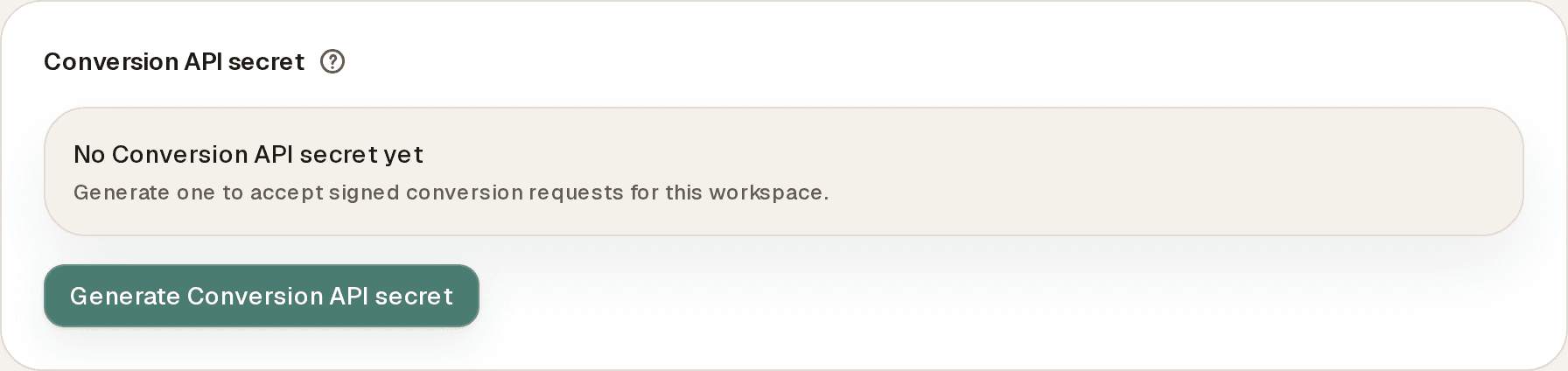
- Find the Conversion API secret panel.
- Click Generate Conversion API secret.
- Copy and store the secret securely in your server-side environment variables. Owners and admins can reveal the current secret later or rotate it with Rotate Conversion API secret; rotating immediately replaces the previous secret.
Never expose this secret in browser-side code or commit it to version control.
Step 3-Capture nim_ct on your landing page
When a visitor clicks your enabled short link, Nimriz appends nim_ct=<token> to the destination URL before redirecting. Your landing page needs to read and store this token.
// Server-side example (Next.js App Router, Express, etc.)
export async function GET(request: Request) {
  const url = new URL(request.url);
  const clickId = url.searchParams.get('nim_ct');

  if (clickId) {
    // Store on the session, lead record, cart, order, or checkout metadata
    await storeClickIdForSession(sessionId, clickId);
  }

  // Render your landing page normally
}
Where to store nim_ct depends on your funnel:
| Funnel stage | Where to store nim_ct |
|---|---|
| Lead/signup form | On the pending lead or CRM contact record. |
| E-commerce checkout | On the cart or order metadata before payment completes. |
| SaaS trial | On the pending trial or account record. |
| Long consideration cycle | Carry it through your CRM pipeline to the closed event. |
Step 4-Send conversion events from your backend
After a business event occurs (a lead is created, an order is paid, a subscription activates), your backend sends a signed POST request to the Nimriz Conversion API.
Endpoint
POST https://api.nimriz.com/api/conversions/callback/:workspace_id
Replace :workspace_id with your workspace's UUID. The easiest source is the Conversion API endpoint panel under IntegrationsDeveloperConversion API, which shows the full callback URL with a copy button; the UUID is also shown as Workspace ID under SettingsWorkspace.
Required headers
Content-Type: application/json
X-Nim-Timestamp: <current unix timestamp in seconds>
X-Nim-Signature: v1=<hex hmac sha256>
Put your retry idempotency key in the signed JSON body as idempotency_key. If you also send the Idempotency-Key header, it must exactly match the body value.
Generating the signature
import crypto from 'node:crypto';

function signConversionRequest({ secret, timestamp, rawBody }) {
  return `v1=${crypto
    .createHmac('sha256', secret)
    .update(`${timestamp}.${rawBody}`)
    .digest('hex')}`;
}

// Usage
const timestamp = Math.floor(Date.now() / 1000).toString();
const body = JSON.stringify(payload);
const signature = signConversionRequest({
  secret: process.env.NIM_CONVERSION_SECRET,
  timestamp,
  rawBody: body,
});
Conversion event types
Nimriz supports five immutable conversion outcome types. Each event type is stored permanently-negative follow-on events (refund, cancellation, reversal) do not overwrite the original positive event.
lead
A non-monetary attributable outcome: form submission, trial signup, demo booking, newsletter subscription.
{
  "event_name": "lead",
  "event_time": "2026-04-01T14:30:00.000Z",
  "event_id": "crm-lead-abc123",
  "idempotency_key": "crm-lead-abc123-v1",
  "user_data": {
    "click_id": "nimct_xxxxxxxxxxxxxxxxxxxxxxxx",
    "external_id": "contact_12345"
  },
  "custom_data": {
    "properties": {
      "source_system": "hubspot",
      "form_type": "demo-request"
    }
  }
}
sale
A confirmed purchase, paid invoice, or subscription activation.
{
  "event_name": "sale",
  "event_time": "2026-04-01T15:05:00.000Z",
  "event_id": "order-xyz789",
  "idempotency_key": "order-xyz789-v1",
  "user_data": {
    "click_id": "nimct_xxxxxxxxxxxxxxxxxxxxxxxx",
    "external_id": "customer_67890"
  },
  "custom_data": {
    "order_id": "order-xyz789",
    "value": 149.00,
    "currency": "USD",
    "quantity": 1,
    "properties": {
      "plan": "pro-annual"
    }
  }
}
refund
A confirmed refund on a prior sale. Must reference the original sale.
{
  "event_name": "refund",
  "event_time": "2026-04-10T09:00:00.000Z",
  "event_id": "refund-xyz789-1",
  "idempotency_key": "refund-xyz789-1-v1",
  "custom_data": {
    "order_id": "refund-xyz789",
    "related_order_id": "order-xyz789",
    "value": 149.00,
    "currency": "USD",
    "properties": {
      "reason": "customer_request"
    }
  }
}
cancellation
A cancellation or void of a prior commitment when it is distinct from a refund in your billing system.
{
  "event_name": "cancellation",
  "event_time": "2026-04-12T11:00:00.000Z",
  "event_id": "cancel-sub-67890",
  "idempotency_key": "cancel-sub-67890-v1",
  "custom_data": {
    "related_order_id": "order-xyz789",
    "properties": {
      "reason": "end_of_contract"
    }
  }
}
reversal
A chargeback or negative financial adjustment when it does not fit the refund or cancellation semantics.
{
  "event_name": "reversal",
  "event_time": "2026-04-15T13:00:00.000Z",
  "event_id": "chargeback-xyz789",
  "idempotency_key": "chargeback-xyz789-v1",
  "custom_data": {
    "related_order_id": "order-xyz789",
    "value": 149.00,
    "currency": "USD",
    "properties": {
      "reason": "fraudulent"
    }
  }
}
Complete field reference
| Field | Required | Type | Description |
|---|---|---|---|
event_name | Yes | String | One of: lead, sale, refund, cancellation, reversal. |
event_time | No | ISO 8601 string | When the event occurred. Defaults to the time Nimriz receives the request. |
event_id | Recommended | String | Your stable business identifier for this event. Used for business-level deduplication. |
user_data.click_id | No | String | The nim_ct value captured from the landing page URL. Enables deterministic click attribution. |
user_data.external_id | No | String | Your stable customer or lead identifier. Lets Nimriz fall back to the same customer's most recent attributed touch when no click_id is supplied. |
custom_data.order_id | Recommended for sales | String | Your order, invoice, or transaction identifier. |
custom_data.related_order_id | Required for refund/cancellation/reversal | String | References the original sale's order_id. |
custom_data.related_event_id | Alternative to related_order_id | String | References the original event's event_id. |
custom_data.value | No | Number | Monetary value. Requires currency when provided. |
custom_data.currency | Conditional | String | ISO 4217 currency code (e.g., USD, EUR). Required when value is set. |
custom_data.quantity | No | Integer | Must be a positive integer. |
custom_data.properties | No | Object | Arbitrary key/value metadata for your own reporting context. |
idempotency_key | Recommended | String | Deduplication key for the request. When omitted, Nimriz derives one from a hash of the raw request body. |
Idempotency-Key header | Optional | String | Must match idempotency_key exactly when present. |
event_id vs Idempotency-Key
These two fields serve distinct purposes and work together:
-
event_idis the stable business identifier for a specific outcome (for example, "this lead was created after clicking the spring campaign link"). Nimriz uses it for business-level deduplication and for negative follow-on events that referencerelated_event_id. -
idempotency_keyprotects a request delivery. Requests that arrive with anidempotency_keyNimriz has already stored for your workspace are treated as redeliveries of the same request, not new events.
To retry a failed or timed-out request safely, you can resend the identical request bytes with the same idempotency_key:
First attempt:   idempotency_key: crm-lead-abc123-v1,  event_id: crm-lead-abc123
Retry attempt:   idempotency_key: crm-lead-abc123-v1,  event_id: crm-lead-abc123  (same key, same body)
If your delivery system sends a fresh idempotency_key for the same business event, keep the same event_id. Nimriz returns the stored conversion event with duplicate: true instead of creating a second conversion.
Query-sensitive destinations
Some destination URLs cannot safely have nim_ct appended because they rely on signed or integrity-protected query strings. Common examples:
- Pre-signed S3 or GCS URLs (contain
X-Amz-Signature,X-Goog-Signature, orpolicyparameters). - Destinations with HMAC-protected parameter sets.
- Payment confirmation URLs with integrity tokens.
When Nimriz detects a query-sensitive destination, it suppresses nim_ct appending rather than risk breaking the redirect. The short link redirects normally to the destination-but without the nim_ct parameter.
What you can still do:
- Use
user_data.external_idin your conversion events to link conversions to customers identified by your own system. - If your system assigns order IDs before the redirect, carry the order ID through your funnel without relying on
nim_ct.
Idempotency and retries
Conversion events are designed to be sent at-least-once safely. If your backend fails or times out when sending an event, retry with the same event_id. Nimriz returns the stored event (with duplicate: true) rather than creating a duplicate.
Rules:
- Same
idempotency_keyplus same payload on a retry returns the stored result, no duplicate. - Same
idempotency_keyplus different payload is rejected with409 idempotency_conflictbecause the key is already associated with a different payload. - Same
event_idplus a freshidempotency_keyreturns the stored conversion event, no duplicate. - If you omit the header entirely, Nimriz falls back to a hash of the raw body, so byte-identical retries still deduplicate. Include
event_idfor business-level deduplication across different delivery attempts.
Viewing conversions in the dashboard
Attributed conversion events appear in your analytics under AnalyticsConversions (the Conversion reporting view).
The view shows:
- KPI counts by outcome over your selected date range: attributed outcomes, sales, leads, and negative outcomes.
- A daily conversion-events chart.
- An Attribution method split: how attributed conversions divide between click-ID, customer-ID, and negative-follow-on attribution.
- A table of attributed conversions with click-time UTM, variant, and experiment context, filterable by domain, short URL, and event type.
Conversion data is also available in analytics exports (see Exports).
Troubleshooting
nim_ct is not appearing on my landing page URL
- Confirm conversion tracking is enabled on the link (the Conversion tracking card on link detail shows "Enabled for this link").
- Check whether the destination URL is classified as query-sensitive. If Nimriz detects a signed URL pattern, it suppresses
nim_ctto avoid breaking the redirect. - Confirm you are clicking the actual short link (not navigating directly to the destination).
Conversion API request is rejected with a 401 or signature error
- Confirm you are using the Conversion API signing secret, not the workspace API key.
- Verify the signature computation:
HMAC-SHA256("${timestamp}.${rawBody}", secret). - Confirm
X-Nim-Timestampis a Unix timestamp in seconds (not milliseconds). - Confirm you are signing the raw request body bytes-do not parse and re-serialize the JSON before signing, as this can alter byte order or whitespace.
Refund/cancellation event is rejected
Negative follow-on events must reference an earlier sale. Include custom_data.related_order_id matching the original sale's order_id, or custom_data.related_event_id matching the original sale's event_id. If no matching sale exists in Nimriz yet, the event will be rejected.
Conversions appear but attribution shows 0%
Attribution requires a valid nim_ct click ID in user_data.click_id. If conversions arrive without a click ID, they are stored (for reporting totals) but cannot be attributed to a specific click. Ensure your funnel is capturing and forwarding nim_ct from the landing page URL to your conversion event.
Related guides
Related next steps
Follow setup and reference guides for Nimriz products and integrations.
A practical walkthrough for connecting branded links, analytics forwarding, ad attribution, automation, and reporting.
How to use short links and UTMs to measure every touchpoint across every channel.
Ready to test this setup?
Create an account to try the workflow, or compare plans when the setup needs higher limits, integrations, or team controls.