
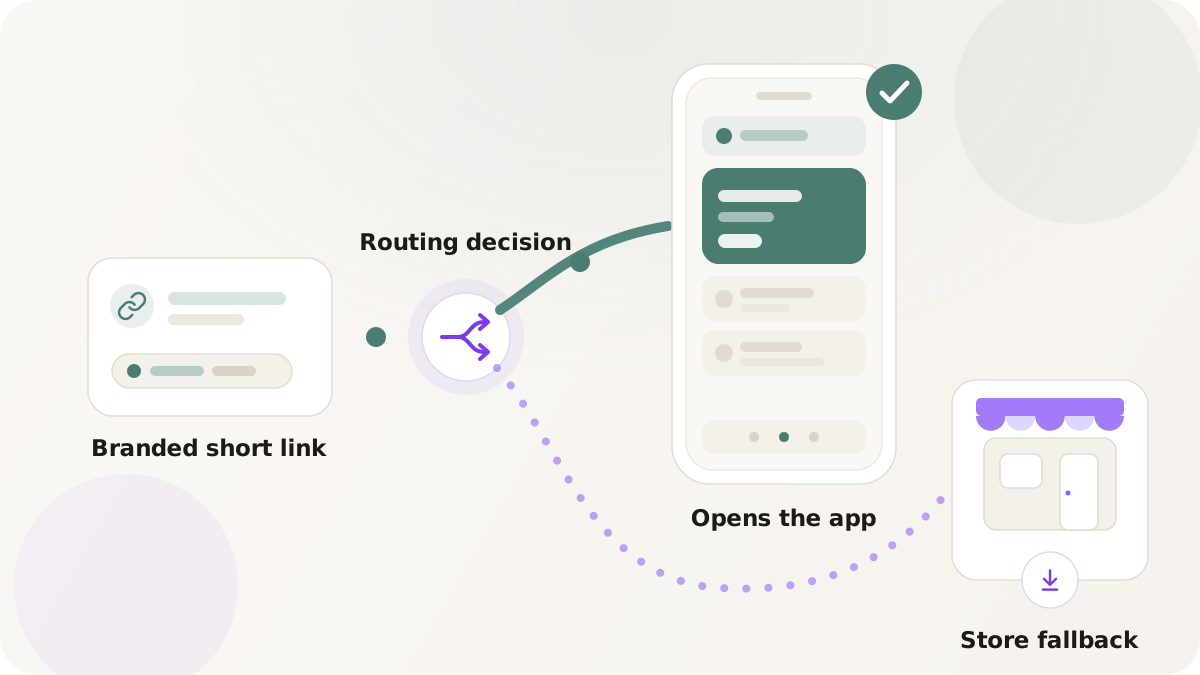
When somebody taps a link that points at your product, the experience should land in your app if your app is installed, in the relevant store if it is not, and on a sensible web page if neither is appropriate. That is the deep-link promise. In practice, most teams never quite get there. They print a QR code that lands in Safari. They send a push that opens a browser screen describing the app. They drop a link into an email that lands at a generic web product page.
Nimriz can do this with one branded short link if the prerequisites are in place. This post covers what those prerequisites are, why they are non-negotiable, how Nimriz decides what to open, what the fallback path looks like, and the common pitfalls.
What "deep link" actually means in Nimriz
A deep link in Nimriz is a routing outcome on a single branded short link. It is not a separate kind of link, and it is not a separate URL you generate alongside the short link. The short link is the entry point; the deep-link action is what the routing layer chooses when the visitor matches.
A deep-link action carries three configured pieces:
- An app target. The configured mobile app for the requesting platform. iOS uses Universal Links via the
apple-app-site-associationfile. Android uses App Links viaassetlinks.json. Nimriz generates and serves both files from the live branded domain. - A store fallback. The App Store URL or the Google Play URL to send visitors to when the app is not the right destination on that platform.
- A web fallback. A standard web URL to send visitors to when neither the app nor the store should be used.
When a deep-link-eligible link is clicked, Nimriz works through that sequence deterministically.
The eligibility rules are strict on purpose
Deep links require more than a plan upgrade. They require a specific kind of domain. The rule is "verified, account-exclusive, branded, ready, and configured for app association."
Why every word in that rule matters:
- Verified. The domain has passed DNS verification.
- Account-exclusive. No other Nimriz account shares this domain. This is what allows the association files (
apple-app-site-association,assetlinks.json) to safely declare which app should open links on the domain. A shared domain cannot honestly point to multiple brands' apps from one file. - Branded. The domain is your branded short domain, not the Nimriz Built-in or any shared domain. Deep-link configuration is rejected on shared hosts.
- Ready. The DNS, Cloudflare, and association readiness checks have completed. Association files exist and are servable.
- Configured for app association. The domain settings include the app identifiers Nimriz needs to mint association files: iOS bundle ID plus Apple Team ID, and/or Android package name plus SHA-256 signing key fingerprint.
If any one of those fails, the domain's deep-link readiness indicator does not show Ready and the association files return 404. That is intentional. Apple and Android cache association files aggressively, and a partial or misleading file is worse than no file at all. Nimriz refuses to serve one until the underlying state is correct.
How a click reaches the deep-link decision
Routing rule evaluation happens at step 8 of the redirect flow; deep-link action resolution happens at step 9, after the matched rule (or the default destination) has been chosen. The full ordering for context:
- Reserved system paths.
- Strict host resolution and short-code lookup.
- Domain readiness.
- Pending account-deletion lockout.
- Root and missing-slug landing.
- Link expiration.
- Password unlock gate.
- Routing-rule evaluation.
- Deep-link action resolution for the matched route or the default destination.
- Query forwarding and merge.
- Click analytics write.
- Redirect response.
A deep-link action is invoked when the routing winner (or the link's default destination) is configured as a smart_mobile destination rather than a plain web destination. From there, Nimriz walks the deterministic fallback sequence below.
The fallback sequence
For every deep-link action, Nimriz tries three options in order. The first one that applies wins.
- App target. Nimriz selects the configured app destination for the requesting platform. The analytics record stores this outcome as a
deep_link_attempt. The actual decision of whether to open the app or fall back happens in the OS, because the edge cannot know whether an app is installed. - Store fallback. If no app target should be used for this platform and a store fallback is configured, Nimriz selects the store URL. The analytics record stores this outcome as
store_fallback. - Web fallback. If neither the app target nor a store fallback applies, Nimriz selects the configured web URL or the link's canonical web destination. The analytics record stores this outcome as
web_fallback.
That order is fixed. There is no option to "try the web first." The product opinion is that someone tapping a deep-link-configured short link is most likely to want the app, then the store, then the web; trying them in a different order produces worse outcomes more often.
A subtle but important point: Nimriz cannot detect whether the app is actually installed. What it does is hand the OS an app-eligible target. The OS opens the app if it is installed and honors the Universal Link or App Link binding; if the app is not installed (or the binding fails), the OS handles the link as a web request and ends up on the web fallback or the store, depending on the platform's behavior. The "store fallback" in Nimriz's model is for cases where you have decided the visitor should not be routed at the app and should go to the store directly, for example a launch announcement that wants to drive installs regardless of current install state.
What the analytics look like
Every click that reaches the routing and deep-link stage records which decision matched and which outcome was chosen. The outcomes you will see for deep-link actions are deep_link_attempt, store_fallback, and web_fallback.
That gives you a meaningful breakdown:
- The proportion of
deep_link_attemptevents on a given short link, segmented by platform, tells you how often you are offering the app path. - A high
web_fallbackrate on an iOS-targeted link is a signal that the iOS app target is not configured or not ready. - A jump in
store_fallbackcorrelates with deliberate install-driving rules.
Note that operational redirects (missing-link landings, expiration landings, password challenges, not-ready-domain fallbacks) do not emit click events with routing attribution. Deep-link analytics only describe traffic that reached the deep-link decision.
A clean setup sequence
Once the domain is verified and account-exclusive, deep-link configuration is a short flow.
- Open the domain in Settings → Domains.
- In the Mobile app section, add the app metadata:
- iOS: App Bundle ID and Apple Team ID.
- Android: Package name and SHA-256 signing key fingerprint.
- Wait for the deep-link readiness indicator to show Ready. The domain has to be verified, traffic-ready, and fully app-configured for the indicator to flip.
- On a link's Routing tab, add a rule with a deep-link action, or configure the default destination as a
smart_mobiledestination. - Configure the app target, the store fallback, and the web fallback for each platform you support.
- Save.
- Test on real devices.
That last step matters more than it sounds. Emulators, browser-based testers, and most desktop-driven preview tools cannot accurately simulate Universal Link or App Link resolution. The Apple and Google bindings depend on the OS state, the install state, and the cached association files in ways that only a real device exercises faithfully. Test the link on:
- An iPhone where your app is installed.
- An iPhone where your app is not installed.
- An Android device where your app is installed.
- An Android device where your app is not installed.
If a tap on an installed-app device opens the browser instead of the app, the app's universal-link / app-link configuration in the app project is the most likely cause. Verify that your iOS app has the Associated Domains capability configured for the branded domain and that the Android app declares an intent-filter for the domain. Those configurations live in your mobile app project; Nimriz cannot do them for you.
Common pitfalls
A handful of mistakes account for most of the deep-link setup pain.
- Trying to deep-link from a generic shortener. A
bit.lyortinyurlURL cannot serve anapple-app-site-associationfile scoped to your app. Universal Links and App Links require the link's host to be the domain associated with the app. Branded domains are not a marketing preference here; they are a technical prerequisite. - Pointing at a domain that is not account-exclusive. Shared hosting of association files is rejected for safety. If your domain is shared with another account, deep links cannot be configured. Verify domain exclusivity before assuming the configuration is broken.
- Missing the Android SHA-256 fingerprint. Android App Links require the signing key fingerprint of the exact build that the user installs. The fingerprint of a debug build does not match the production build, and vice versa.
- Skipping real-device testing. A link that "works in the simulator" is meaningless. Test on real devices, both with the app installed and without.
- Forgetting Apple/Android cache windows. Both platforms can cache association files longer than Nimriz's own HTTP caching headers suggest. After a configuration change, allow time for the platform cache to refresh before declaring the new state broken.
- Putting the deep-link action behind a too-narrow routing rule. If only
device_os = iosroutes to the deep-link action, Android visitors get whatever the default destination is. Confirm the action covers every platform you intend to deep-link, or apply it to the default destination.
When deep links are not the right tool
Deep links solve one problem: "I want a tap on this short link to land in my app." They are not the right tool when:
- You do not have a mobile app yet. Configure the OS-targeted store-listing pattern with smart routing, which only needs
device_osrules and web URLs to the App Store and Play Store. No deep-link configuration required. - The destination is fundamentally web. A blog post, a product page on a marketing site, a help article. Sending a visitor to the app for those is friction, not convenience.
- Your domain situation does not satisfy exclusivity. If switching domain ownership is not feasible, the OS-targeted store-listing pattern is the closest substitute.
Next steps
- Smart routing by country, device, and time - the routing layer deep-link actions live within.
- How to set up branded links - the domain work that precedes deep-link readiness.
- Offline to online growth - the printed-medium scenarios deep links most clearly improve.
- QR code sizing - scannability mechanics for QR codes that drop into a deep-linked short link.
- Routing rules and preview docs - the canonical reference for deep-link configuration, eligibility, and fallback order.