
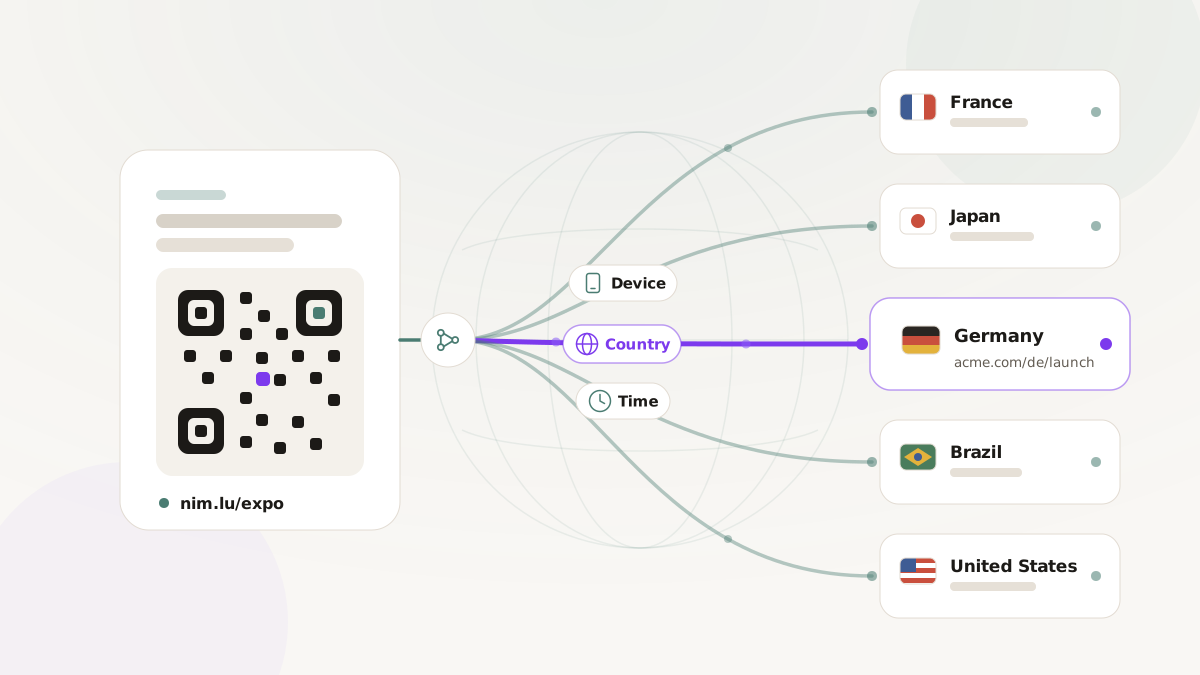
You are shipping one printed QR poster to events in five countries, and you want each scan to open the right localized page. Today that leaves you with bad choices. Print five versions of the poster and pray each region gets the right batch. Print one, point it at a single landing page, and watch four countries land on copy they cannot read. Or spin up five short links and hope every regional team uses theirs and not a colleague's. Every one of those options adds cost, breaks somewhere, and cannot be fixed once the posters are in the wild.
The way out is to stop treating a short link as a fixed pointer to one destination. A link can decide where to send each visitor at the moment they click, based on where they are, what device they are holding, and when they arrived. This is a playbook for setting up that kind of routing so one printed link does the work of five.
One link, many right answers
A routing-enabled branded short link carries an ordered list of rules. Each rule says "if the visitor matches these conditions, send them here." Nimriz reads the list top to bottom and uses the first rule that matches. If none match, the link falls back to one explicit default destination, so traffic always has a safe place to land.
That last point is the whole reason this is safe to print on something permanent. The QR code encodes one URL forever. The routing rules behind it are editable any time, and there is always a default catching anyone your rules did not anticipate.
The three levers you can route on
Keep the mental model simple. You have three signals to route on, plus a default.
- Country. Where the request comes from, by two-letter code (
US,DE,GB). This is your localization lever. - Device. The operating system (iOS, Android, and the desktop families) or the device type (mobile, tablet, desktop). This is your "send people where their device can actually use the link" lever.
- Time. A start and end window evaluated in UTC. This is your "the campaign changes on a schedule" lever.
The full condition reference lives in the routing rules and A/B testing docs. For the plays below, those three levers are all you need.
Three plays inside one event campaign
Picture a single product launch promoted at events across the US, Germany, the UK, France, and Japan. Here is how the same campaign uses all three levers.
Play 1: regional pages from one poster
The poster carries one link, links.yourbrand.com/launch. You add one rule per country, each pointing at the localized landing page for that market, and you leave the default destination set to your English global page. A scan in Berlin opens the German page, a scan in Tokyo opens the Japanese page, and a scan from a country you did not target falls through to the global page. One asset goes to the printer. Five audiences see something relevant. Your report still shows one link.
Play 2: app store by operating system
The same launch pushes a companion app, and the "Get the app" link in your follow-up email has to know which store to open. Two rules handle it: iOS visitors go to the App Store, Android visitors go to the Play Store. The default destination is a plain web page describing the app, which covers desktop and anything else. This is ordinary web routing, so it works on shared and built-in domains without any extra setup. (Opening the app directly on tap, rather than its store listing, is the separate deep-link path, which needs a verified branded domain you control exclusively.)
Play 3: a Black Friday time cutover
The deal goes live Friday and ends Sunday night, and nobody wants to be awake editing links at the boundary. A rule with a time window pointing at the live deal page handles the sale, and a catch-all default points at a "the sale has ended, here is what is next" page. When the window closes, visitors roll onto the follow-up page on their own. The link is the schedule.
Get the rule order right
Because Nimriz stops at the first matching rule, order is the one thing people get wrong. The principle: specific rules go above broad ones.
The classic mistake is a catch-all rule sitting at the top. A rule with no conditions matches everyone, so anything below it never runs and every visitor gets the same page. Keep the catch-all at the bottom, always. The second mistake is ordering a broad rule above a narrower one that overlaps it. If you want US iOS visitors to hit the App Store but other US visitors to hit a web page, the combined "US and iOS" rule has to sit above the plain "US" rule, or the broad US rule wins for everyone and the app branch never fires.
Test before you print
The cost of a routing mistake scales with how many posters you already shipped, so spend the five minutes to check it first. The dashboard includes a routing simulator: you describe a synthetic visitor (a country, an OS, a device type, a timestamp) and it tells you which rule matched and where that visitor would land.
Before a print run, simulate the cases that matter:
- Each country and device combination you wrote a rule for.
- One combination you did not target, to confirm the default catches it.
- Both edges of every time window, a minute before and a minute after the cutover.
The simulator confirms your eligibility and ordering, but it cannot tell whether a given phone has an app installed, so do one real scan on a real device before signing off. Every click that reaches routing also records which rule fired, so after launch your analytics show how traffic actually split across markets.
What you get back
Print once, route smartly, and measure it: one printed asset instead of five, one link in every report instead of a tangle, and a campaign you can re-point after the posters are already on the wall. Build your first rule with the routing rules and A/B testing docs. For the printed-campaign scenarios that get the most out of country and device routing, see offline-to-online growth, and when you want to test two destinations on a link you already printed, see A/B testing branded short links.