
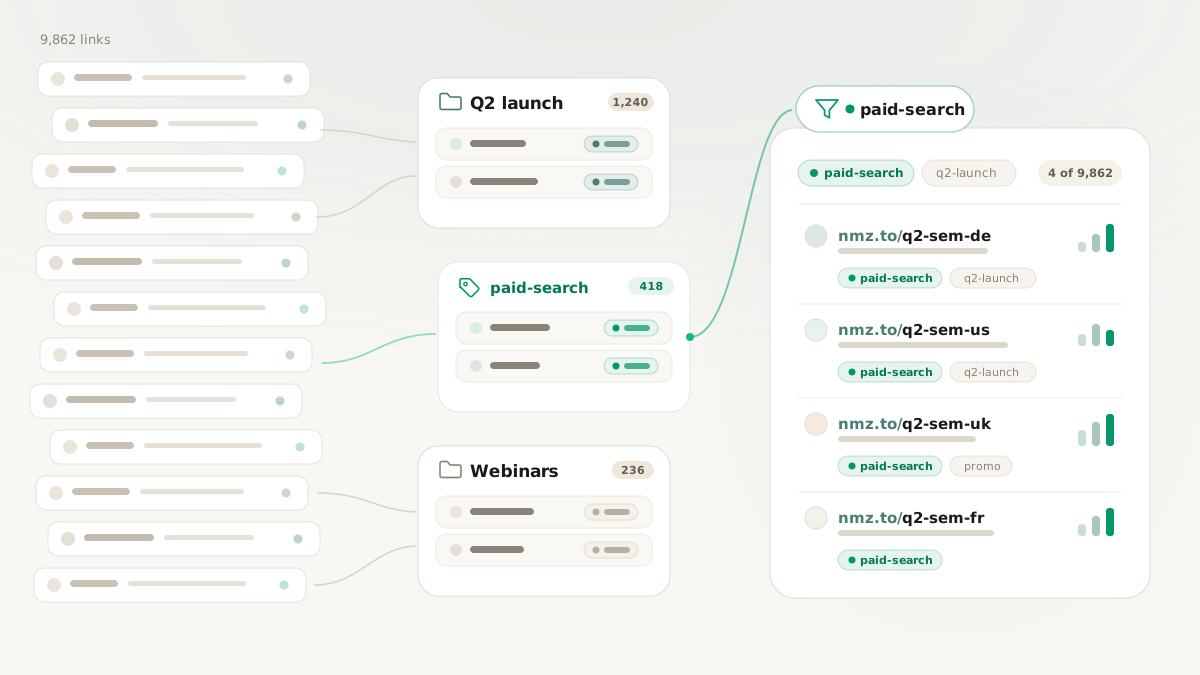
It is quarter-end, and a client emails: send us every paid-search link from the Q2 launch. You open the link list and start scrolling through thousands of entries with names like acme-q2-promo-ps-desktop-v3, squinting for the ones that match. Twenty minutes in, you have a list you are only mostly sure is complete, and you still have nine other clients to report on. The library that was supposed to make you fast is now the slowest part of your week.
A link library of a few dozen URLs takes care of itself. A few thousand, spread across teams or clients, becomes a navigation problem in its own right, and the usual responses make it worse: cram every dimension of meaning into the slug, or bury it all in free-text notes. Neither is findable later. This is a playbook for organizing links so that any campaign, channel, or client is one filter away, and stays that way as the library grows.
The slug is not your filing system
The mistake underneath the messy library is asking the slug to do two jobs. The slug exists for the human who reads the URL in the wild; it is not where your organizational scheme should live. Stuffing agency-acme-q2-promo-paid-search-desktop-v3 into a slug makes the URL ugly and the library no easier to query.
Pull organization into its own layer with two primitives. A space answers "where does this link live?" A link belongs to exactly one space, its home container. Tags answer "what is this link about?" A link can carry as many tags as it needs. The discipline falls out of the shapes: the moment you wish a link could be in two spaces, what you actually want is one space plus a tag. Spaces are for ownership; tags are for everything that cuts across ownership.
One thing spaces do not do is gate access. Any member with read permission sees links across all spaces; spaces organize the view, they do not lock it. If you need true isolation between clients or teams, that is what separate workspaces under one organization are for. The full behavior is in the spaces and tags docs.
A copyable starter taxonomy
You do not need to invent this. Pick one bucketing dimension for spaces and a small, controlled vocabulary for tags, and you have a structure that survives most teams' first year.
Spaces (pick one dimension and commit to it):
- Single-product company: by team.
Marketing,Growth,Lifecycle,Sales,Brand. - Multi-product company: by product.
Product A,Product B,Product C. - Agency: by client. One space per active client.
Tags (lowercase, hyphenated, reused not reinvented):
- Channel:
paid-search,paid-social,organic-social,email,sms,direct-mail,print,event,partner. - State:
draft,live,paused,archived. - Campaign: by name, time-boxed, retired when the campaign ends.
q2-launch,holiday-2026.
The single most important rule is to treat tags as a controlled vocabulary, not free text. A workspace where one person writes paid-search, another paid_search, and a third Paid Search is a workspace where every report silently drops a third of the data. Agree on lowercase and hyphens, write it down, and stick to it.
The same library, one filter away
Run the quarter-end request through this structure. An agency keeps a space per client (Client A, Client B, Client C) and tags every link with channel, campaign, and state. A link for Client B's paid-search Q2 launch lives in the Client B space and carries paid-search, q2-launch, and live.
The client's request, "every paid-search link from the Q2 launch," is now a filter, not a scroll: the Client B space plus the paid-search and q2-launch tags returns exactly that set, complete, in seconds. Five months on, the campaign is over: the link stays in Client B (still the same client) but its live tag becomes archived. The home did not move; the label did, because the campaign moved on. That same space-and-tag scoping is what lets you hand a client their own recurring report, covered in scheduled analytics reports.
The 15-minute cleanup
If your library is already a mess, you do not need a six-hour reorganization, you need one focused pass:
- Create your spaces first. Decide the one dimension (team, product, or client) and create those spaces before touching individual links.
- Assign homes in bulk. Filter the list by whatever rough signal you have (a substring in old slugs, a date range) and assign each batch to its space.
- Tag the cross-cutting dimensions. Add channel and state tags from your controlled vocabulary as you go. Resist inventing a new tag for a one-off; if it will only ever apply to one or two links, skip it.
- Clear the junk. Anything that landed in a vague
Miscspace is a signal your spaces are too coarse or your tags too narrow. Re-home it.
Fifteen minutes of this beats another quarter of scrolling.
The quarterly audit that keeps it clean
Taxonomies drift. A short recurring review catches it before it compounds. Once a quarter, scan for the warning signs:
- One space holding the majority of the workspace's links (too coarse, or the others are too narrow).
- A tag list that keeps growing; 80 unique tags means nobody remembers which to use. Cut to the ones that actually get filtered or reported on.
- The same concept living as both a space and a tag. Pick one.
- Important sorting information buried in free-text descriptions, where filters and reports cannot see it.
A 30-minute audit every quarter beats a rescue mission once a year.
What you get back
The payoff is direct and measurable: the time it takes to answer "give me every X link" drops from a scroll-and-squint to a single filter, and you can trust the result is complete. Set up your spaces and tags with the spaces and tags docs. To keep the structure clean as you generate links in bulk, apply it at creation time, as covered in link automation recipes, and keep the attribution layer consistent alongside it with UTM best practices.