
Almost every social media platform limits profiles to a single clickable link. Instagram, TikTok, X (Twitter), LinkedIn personal profiles, Pinterest, Threads - one URL, one shot to capture the interest of someone who has just scrolled through your content and decided they want to know more.
Most brands respond to this constraint in one of two ways: they put their homepage URL in the bio and leave it there indefinitely, or they swap the URL out constantly and confuse followers who remember clicking a different link last week.
Both approaches are suboptimal. A thoughtful bio link strategy treats this single URL slot as prime real estate - changeable, trackable, and capable of reflecting exactly what your brand is doing right now.
The problem with a static homepage URL
Your homepage is designed for first-time visitors who know nothing about your brand. It carries navigation, general messaging, brand story, and a dozen different calls-to-action. For a follower who just watched your latest product tutorial and wants to buy the thing you just demonstrated, landing on a homepage is friction.
The link in your bio should lead to the thing that is most relevant to your audience right now. What you posted this week. The campaign that is running today. The announcement you just made. A static homepage URL makes every click from your social profile take a detour.
Beyond relevance, a static homepage URL tells you nothing analytically. You know traffic came from "Instagram" or "TikTok" (if the platform passes referrer data), but you cannot distinguish organic profile visits from link-in-bio clicks, and you cannot track what content drove those clicks.
The short link bio strategy
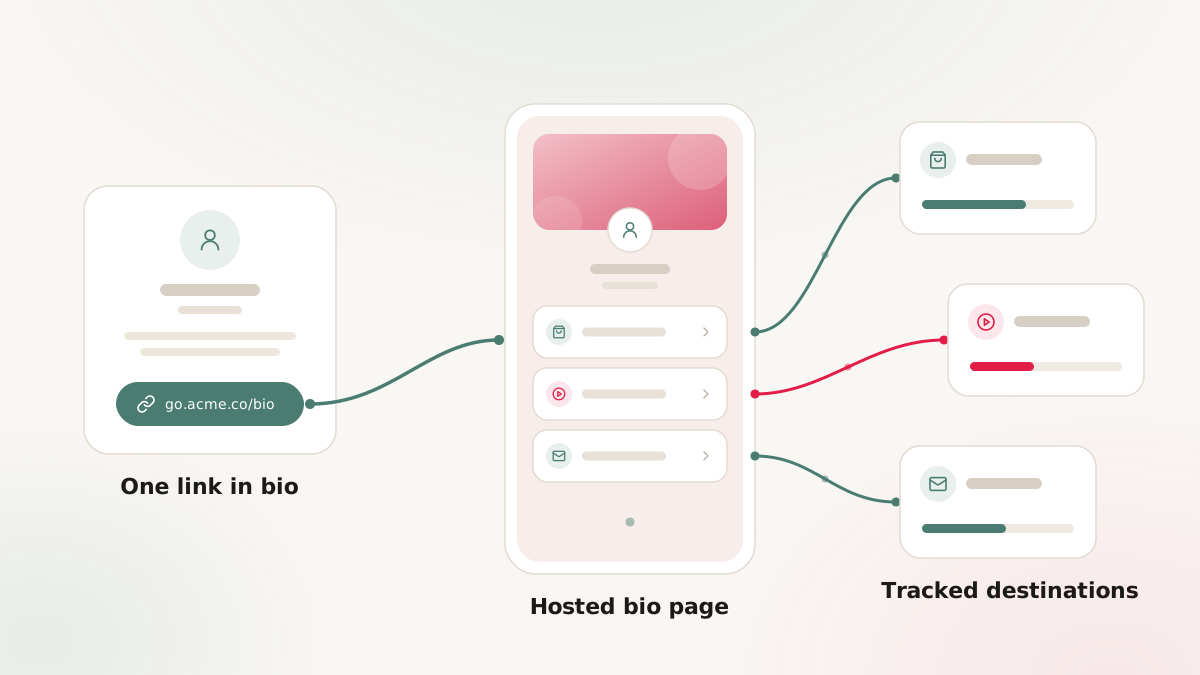
The approach: use a single, stable branded short link as your bio link. Keep the slug clean and human-readable. Change the destination URL as often as you need to - daily during a launch, weekly during a normal content cadence - without ever changing the bio link itself.
The bio link is the address. The destination is the room it leads to. One address, many possible rooms.
Practical example:
- Bio link:
links.yourbrand.com/ig- permanent, never changes. - Monday: destination points to a new product page.
- Thursday: you announce a sale, destination updated to the sale landing page.
- Following Monday: sale ends, destination updated to the new collection.
Followers who have saved your bio link always get the current, relevant destination. And because it is a branded link on your own domain, the bio itself looks clean and professional.
Tracking bio link performance with UTMs
A bio link without attribution is a missed opportunity. Every click from your bio link should arrive at your destination tagged with consistent UTM parameters that identify the source.
A typical bio link UTM structure:
utm_source=instagram(ortiktok,x,linkedin)utm_medium=social_organicutm_campaign=bio_linkutm_content=current_destination(optional, changes per destination)
With these parameters, your analytics can answer:
- How many website visits are coming from Instagram bio clicks vs. direct traffic?
- How does Instagram bio link traffic convert compared to Instagram Story swipe-ups?
- How does TikTok bio traffic compare to Instagram bio traffic?
These answers directly inform where to invest creator energy.
Multiple platforms, multiple bio links
If you are active on more than one platform, create a distinct bio link for each:
links.yourbrand.com/ig- Instagramlinks.yourbrand.com/tt- TikToklinks.yourbrand.com/li- LinkedIn
Each link points at the same destination (you update all of them when the campaign changes), but because they are separate links, your analytics can distinguish traffic by platform. This is a significant improvement over using a single link across every platform, where you lose the per-platform breakdown.
Content-specific links: the "link in bio" post convention
The "link in bio" convention - posting content that explicitly references the bio link - is a standard part of organic social strategy. "Head to the link in our bio to shop this look." "Link in bio for the full recipe." "Link in bio to register."
For these moments, a bio link that was last updated three days ago for a different campaign creates a broken experience. A viewer who follows the CTA from today's content and lands on yesterday's campaign page is a lost conversion.
The operational discipline: whenever you post content with a "link in bio" reference, update the bio link destination at the same time or before the post goes live. Treat bio link updates as a mandatory step in the content publishing workflow, not an afterthought.
A content calendar that includes a column for "bio link destination" makes this systematic: the person scheduling content is also responsible for confirming the bio link destination matches the CTA in the post.
The "link in bio page" alternative and when to use it
Some brands use link aggregator pages as their bio link - services like Linktree or a custom-built page that lists multiple links. These are useful when you consistently want to give visitors a choice between destinations (podcast, newsletter, store, latest post) rather than directing them to one specific place.
When to use a link aggregator page in your bio:
- Your content is genuinely multi-topic and your audience regularly wants to reach multiple destinations.
- You have persistent, evergreen resources (a newsletter signup, a press kit, a portfolio) that you always want to offer alongside current campaign links.
- Your audience is new enough that they need orientation to your brand's different offerings.
When a direct short link is better:
- You have a strong, specific campaign or content moment where a single destination converts better than a choice.
- Your audience is established and knows where to go; they just need the right destination for today's content.
- You want clean, one-step conversion without the friction of an intermediate "choose your destination" page.
Many brands use both: a link aggregator page for evergreen periods, and a direct short link during active campaigns that overrides the aggregator temporarily.
Creator and influencer profiles
Influencer and creator accounts face the same constraint with higher stakes. If a brand pays for an influencer integration and the "link in bio" the influencer posts leads to a generic homepage rather than the campaign-specific landing page, performance suffers and attribution breaks.
For paid integrations, brand and creator should align on:
- The specific destination URL the bio link should point to during the campaign window.
- The UTM parameters to use (brand's UTM taxonomy, not the creator's).
- The exact time window when the bio link should reflect the campaign destination.
Providing the creator with a pre-built Nimriz short link - with all the UTMs already embedded - standardizes this across every integration. The creator points their bio at the provided link; the brand controls the destination and the attribution.
Auditing your bio link performance
A regular audit of bio link performance tells you whether your link-in-bio strategy is working. Monthly at minimum, check:
- Total clicks from each platform's bio link (segmented by source UTM).
- Conversion rate from bio link traffic vs. other traffic sources to the same destinations.
- Which content posts drove the most bio link clicks (requires correlating post timing with click spikes in the data).
The last analysis - correlating post timing with bio link click spikes - is particularly valuable. It shows which content topics and formats drive the highest bio link engagement, which informs the editorial calendar.
- UTM best practices - complete guide to building consistent UTM parameters
- Custom branded links vs. generic shorteners - why your bio link should be on your own domain
- How to set up branded links - getting your domain ready in 30 minutes