
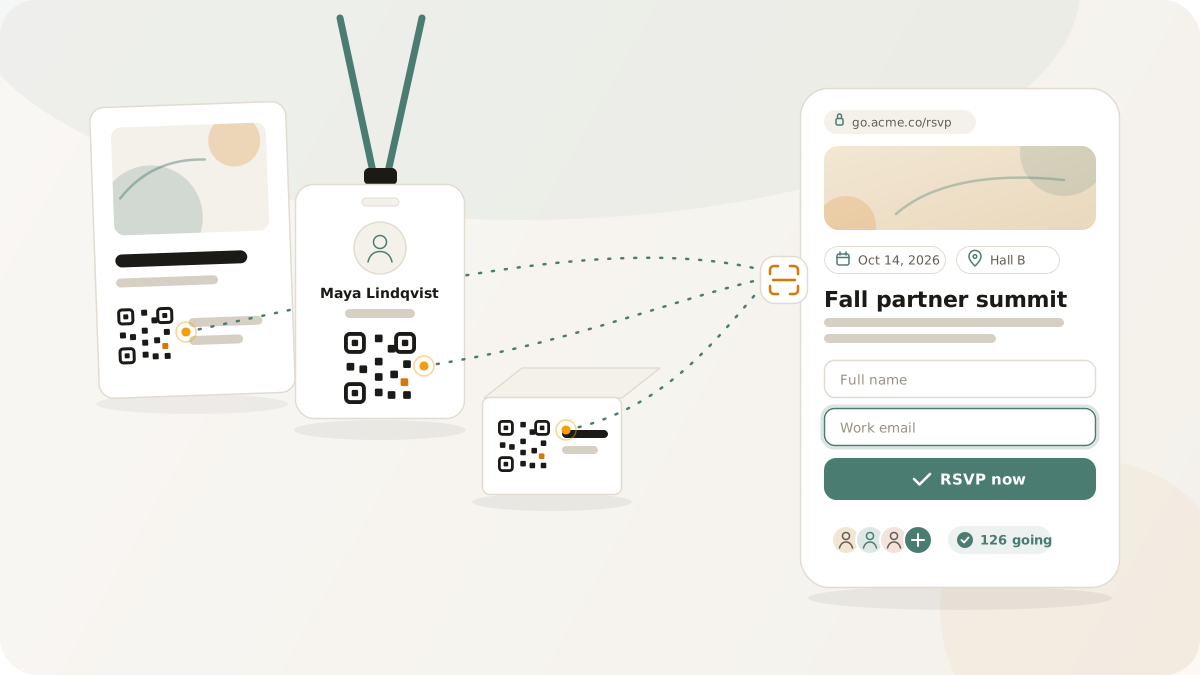
Events consume a disproportionate share of marketing budgets. A mid-size booth at an industry conference runs $10,000-$50,000 before travel and materials. A hosted networking dinner can cost thousands. A product launch event requires months of planning. Despite all that investment, most teams leave events with a stack of business cards, a rough headcount, and a vague sense that "it went well."
The gap between event spend and event measurement is one of the widest in marketing. But it does not have to be. When every physical touchpoint at an event - badges, posters, table cards, handouts, presentation slides - carries a tracked QR code pointing to a purpose-built event page, you leave with scan data, RSVP records, geographic engagement patterns, and a clear lead list for follow-up.
This playbook covers the full event marketing workflow: creating event pages, collecting and managing RSVPs, distributing QR codes on event materials, tracking engagement, and measuring ROI after the event ends.
Building the event page
The starting point is a hosted event page that serves as the central hub for everything an attendee or prospect needs. In Nimriz, an event page includes:
Event details. Date, time, location, and a description of the event. These are the basics that every attendee and prospective attendee needs. The location field supports full addresses, which means attendees can tap to open directions on their phone - a small convenience that matters when someone scans a QR code on a poster and needs to get to the venue.
RSVP collection. An RSVP form on the event page captures attendee registrations. The form collects name and email at minimum, with optional phone and company fields. Each submission is a confirmed lead with clear intent - they did not just glance at your booth, they actively registered for your event.
Calendar download. A calendar CTA lets attendees add the event to their phone or desktop calendar with a single tap. The .ics file includes the event name, date, time, location, and description. This is one of the highest-value micro-conversions at the pre-event stage - a calendar entry means the attendee has committed a slot and is significantly more likely to show up.
Visual branding. The event page uses your workspace branding - logo, colors, and domain. When someone scans a QR code on your conference booth and lands on a page that matches your booth design, the experience feels cohesive rather than disconnected.
QR code distribution across event materials
The principle is simple: every physical surface at an event that a person might look at should carry a QR code that does something useful. Here is how to think about placement:
Conference badges and lanyards
A QR code on a badge or lanyard is the most personal event QR placement. When someone meets you, they can scan your badge to get your contact info, RSVP for a follow-up meeting, or access your product demo page. Use a short link with a clear CTA layout - "Scan for my card" or "Save my contact" - so the action is obvious.
Posters and banners
Large-format event signage is the highest-visibility QR placement. A poster at the entrance to a conference hall or beside your booth can drive significant scan volume if the QR code is large enough and the CTA is clear. Point this QR code at your main event page with the RSVP form.
Size matters here. A QR code on a poster scanned from 2-3 meters needs to be at least 15 cm. See QR code sizing for distance-specific guidance.
Table cards and tent cards
For seated events - dinners, workshops, roundtables - a table card with a QR code is effective because the audience is captive. They are sitting, their phone is accessible, and they have time. Point the QR code at the event page for calendar save, or at a feedback form, or at a post-event resource page depending on the stage of the event.
Presentation slides
A QR code on the closing slide of a presentation captures the audience at peak engagement - they just listened to your talk and are interested. Link to a resource page, a demo signup, or a gated content download. This is one of the highest-converting QR placements because intent is maximized.
Printed handouts and brochures
Every handout should have a QR code. Even if the handout contains detailed information, the QR code creates a digital bridge - the attendee can scan and save the link rather than carrying the physical piece. Use a distinct short link for each handout variant so you can measure which materials drive the most engagement.
Tracking scans by geography
For events with multiple locations - a conference tour, a series of regional meetups, or booths at different trade shows - geographic scan data tells you which locations are generating the most engagement.
Nimriz captures country and region data from each scan. When you create distinct short links for each event location (e.g., links.yourbrand.com/expo-nyc and links.yourbrand.com/expo-la), the analytics show scan volume, timing, and geographic distribution per location. The heatmap view makes geographic patterns immediately visible.
This data directly informs future event investment decisions. If your Chicago event generates 3x the scan engagement of your Atlanta event at similar booth costs, that is a signal about where your audience is most concentrated and most responsive.
Managing RSVPs
RSVPs collected through event pages are stored and accessible from your Nimriz dashboard. Each RSVP record includes:
- The attendee's submitted information (name, email, and any optional fields)
- The timestamp of submission
- The event page they registered through
For teams managing multiple events, this creates a clean, per-event attendee list without the spreadsheet chaos of manual registration. Export the RSVP list as CSV for import into your event management, email, or CRM platform.
Pre-event communication
Once RSVPs are collected, the exported list becomes your pre-event communication audience. Send confirmation emails, logistical updates, and pre-event content to confirmed attendees. The fact that these contacts opted in through an RSVP form means your communication is expected and welcome.
Day-of check-in
The RSVP list doubles as a check-in reference. Compare walk-in attendees against the RSVP list to understand your show-up rate - the percentage of people who registered and actually attended. This metric is critical for future event planning: if your show-up rate is consistently 60%, you know to overbook by 40% to fill the room.
Post-event follow-up
The 48 hours after an event are the highest-leverage window for lead follow-up. The attendee remembers the conversation, the context is fresh, and the intent is still warm.
Export your data promptly. Download the RSVP list and scan data within a day of the event ending. The longer you wait, the colder the leads get.
Segment by engagement level. Not all event leads are equal. Someone who RSVPed, attended, and scanned three different QR codes during the event is a warmer lead than someone who scanned one code in passing. Use scan frequency and the specific links scanned to create engagement tiers.
Personalize the outreach. If you know which QR code a lead scanned - the product demo link, the pricing page, the case study - reference that in your follow-up. "I saw you checked out our enterprise case study at the event - here's the full version" is vastly more effective than a generic "Great meeting you" email.
Track post-event conversions. Keep the event short links active after the event. Some attendees will share the links with colleagues, revisit the event page, or scan QR codes on materials they took home. Post-event scan data often shows a secondary engagement peak 3-7 days after the event as attendees process their notes and follow up on things they found interesting.
Measuring event ROI
Event ROI calculation requires connecting event costs to measurable outcomes. With tracked QR codes and RSVP data, you have the inputs:
Total scans across all event QR codes give you an engagement volume number. This is the digital equivalent of "booth traffic" but with precise counts rather than estimates.
Unique RSVP submissions represent confirmed leads generated by the event.
Post-event link activity shows ongoing engagement after the event ends, indicating lasting interest rather than in-the-moment curiosity.
Downstream conversions - if your short links include UTM parameters and your analytics platform tracks conversions, you can trace event-originated traffic through your funnel to actual business outcomes.
The formula becomes concrete: total event cost divided by leads generated gives you a cost-per-lead for the event. Compare this against your digital acquisition cost-per-lead, and you have a genuine apples-to-apples ROI comparison between event marketing and digital marketing spend.
Event QR checklist
Before the event:
- Create the event page with date, time, location, and description
- Enable RSVP collection with appropriate fields
- Create distinct short links for each material type (poster, badge, handout, slide)
- Generate QR codes with CTA layouts for each placement
- Add UTM parameters for event attribution (
utm_source=event,utm_campaign=event_name) - Test every QR code on two phones at the expected scanning distance
- Print materials at appropriate sizes
After the event:
-
Export RSVP data within 24 hours
-
Review scan analytics by link and geography
-
Segment leads by engagement level
-
Send personalized follow-up within 48 hours
-
Keep event links active for post-event engagement tracking
-
Calculate cost-per-lead and compare against other channels
-
QR code sizing: what actually works - print size guidelines by scanning distance
-
QR CTA layouts - increasing scan rates with call-to-action layouts
-
Offline-to-online growth - the broader physical-to-digital strategy