
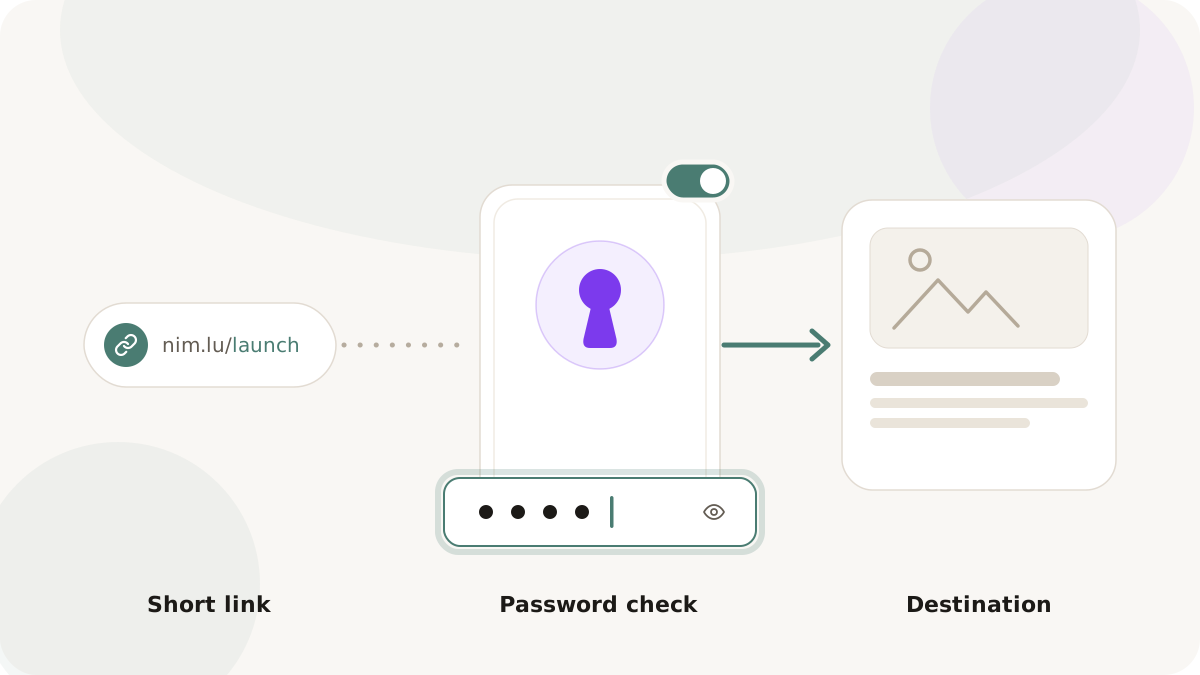
Not every link you create should be accessible to everyone. Investor relations documents, early-access product previews, client proposals, internal campaign briefs, and limited-access content all benefit from access control. The question is: what kind of access control is right for each situation?
Full authentication flows - login pages, SSO, email-verified access - are the right answer for sensitive internal systems. But for marketing and content distribution, they create so much friction that they defeat the purpose of sharing. A client who receives a proposal link and is asked to create an account and verify their email will not complete that flow. They will email you back asking for a different way to view the document.
Password-protected short links occupy the middle ground. They require a known secret to access, creating meaningful access control without requiring registration, account creation, or IT overhead. This article covers when password protection is the right tool, how to design it well, and the operational practices that keep it effective.
What password-protected links actually do
When a short link is configured with password protection in Nimriz, visiting the link presents a simple prompt. The visitor must enter the correct password to be redirected to the destination. An incorrect password does not reveal the destination or any information about its contents.
The protection lives at the short link layer, not the destination URL layer. This means you can use password protection on links to destinations that are themselves publicly accessible - the protection is about controlling who has the short link plus the knowledge of the password, not about technical server-level access control.
This is an important distinction. Password-protected short links are access control through obscurity + knowledge, not through authentication and authorization systems. They are appropriate for use cases where:
- The consequence of unauthorized access is low to medium severity.
- You need fast, frictionless sharing with a specific known audience.
- You cannot or don't want to modify access control on the destination resource itself.
For high-security scenarios - HIPAA-regulated medical data, legal documents, financial records with regulatory requirements - use appropriate authentication systems, not link passwords.
Use case: client deliverables and proposals
An agency or consultant sharing a proposal or campaign report with a client faces a specific challenge: the document should not be publicly indexable, but creating a client portal login for a one-time interaction is disproportionate.
A password-protected short link solves this cleanly. The process:
- Upload the proposal PDF or deck to a document hosting service.
- Create a short link to the hosted document with a password set.
- Share the short link and the password separately - the link in an email, the password in a text message or follow-up call.
Separating the link and password across two channels prevents a single intercepted email from granting access. It is not bank-vault security, but it is a meaningful uplift over an unprotected link.
Use case: early-access content
A product team preparing a launch wants to share preview content - a features walkthrough video, an early demo, a press kit - with a specific list of journalists, influencers, or investors before the public launch date.
Sending unprotected links creates the risk of the content circulating before the intended reveal. A password-protected link means the content exists at a URL that can be linked and shared widely, but only resolves for recipients who know the password.
After the launch date, the password can be removed (or the link updated to point at the public version of the content). The same short link becomes the public link - no re-distribution needed.
Use case: team and internal content distribution
Internal campaign briefs, brand guidelines, media kits, and team-specific resources are often distributed via shared links. Posting an unprotected link to a sensitive internal document in a company Slack where external guests might be present is a common accidental exposure vector.
A password-protected link adds a simple speed bump: anyone who finds the link still needs the password to access it. For genuinely sensitive internal documents, this is not a substitute for proper access control - but for moderately sensitive marketing materials, it is a proportionate and practical measure.
Use case: gated premium content
A content marketing team producing high-value guides, research reports, or webinar recordings faces the classic gating decision: free access for reach, or gated access for lead generation. Password-protected links offer a third option: manually distributed gated access.
Rather than a formal landing page with a lead capture form, a content team can distribute a password-protected link to their newsletter audience, a specific community, or a partner audience. The password becomes the membership signal. Community members receive the password via a channel they already trust; outsiders without the password cannot access the content.
This pattern works particularly well for community-first brands where a formal gated content form would feel out of character with the brand voice.
Choosing and managing passwords
Password selection matters more than it might seem. A few principles:
Use a word, not a random string. A password like springkit2026 is far more usable than 8xK#p2m. Recipients need to type it accurately, often on a mobile device. Random character strings produce errors and frustration.
Never reuse passwords across campaigns or clients. If one password leaks, it should not compromise other protected content.
Match password lifespan to content sensitivity. A password for a two-week early-access preview can be simple and short-lived. A password for ongoing client deliverables should be rotated regularly.
Distribute link and password through separate channels. If both travel in the same email, a forwarded email grants full access. Sending the password in a different channel - SMS, phone call, separate email thread - adds meaningful separation.
Document password assignments. Keep an internal record of which password is used for which link, especially if multiple team members manage link creation. The record should be stored in a secure location (password manager, not a plain text file).
What password protection does not do
To use this feature correctly, it is important to be clear about its limits:
It does not make the destination URL secret. Someone who correctly enters the password will be redirected to the destination URL, which will then appear in their browser. They now know the destination URL and can share it directly.
It does not prevent sharing. A recipient who knows the password can share both the link and the password with anyone.
It does not provide audit trails on its own. Without additional instrumentation, you know how many total clicks the link received, but not who entered the correct password and when.
It does not replace authentication for sensitive data. Regulatory-grade data protection requires proper authentication systems, encryption, and access control - not a URL password.
Operational checklist for password-protected campaigns
-
Password is simple enough to type accurately on mobile.
-
Link and password are distributed via separate channels.
-
Password is documented in an internal secure record.
-
An expiry date is set if the access window should be time-limited.
-
After the access window, the link is either expired, password-changed, or destination-updated so old passwords no longer grant meaningful access.
-
Team members with access to the link management dashboard understand not to share the destination URL directly, as this bypasses the protection.
-
Link expiry and time-sensitive campaigns - combining expiry with password protection for maximum control
-
How to set up branded links - getting your branded domain ready