
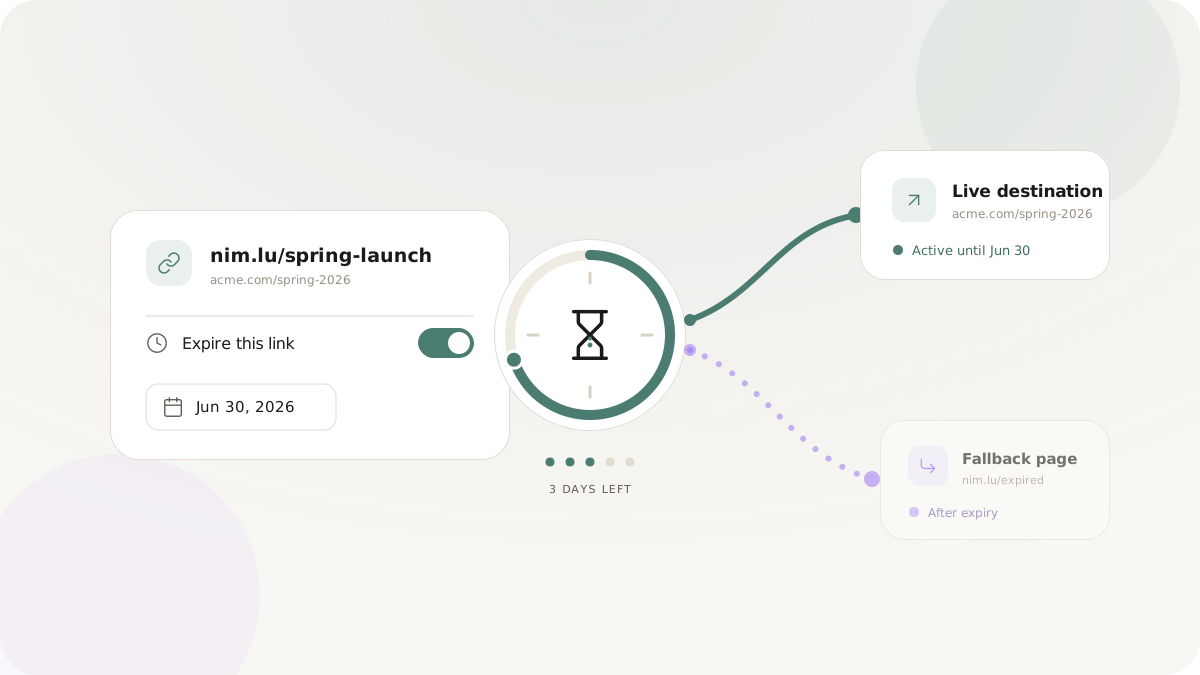
A short link that resolves indefinitely is not always the right tool. For time-sensitive marketing - flash sales, limited-availability offers, event registrations with capacity limits, early-access windows, gated content with a deadline - a link that expires is not a limitation. It is a feature that protects your campaign integrity and creates better user experiences.
This post covers when to use link expiration, how to design graceful fallback behavior, operational considerations for teams managing expiring links at scale, and advanced patterns for campaigns where time itself is part of the marketing message.
Why link expiration matters for marketing integrity
Imagine a Black Friday offer: 40% off, valid for 48 hours. You distribute the short link via email, SMS, and social channels. The campaign ends. The offer is over. But the link is still live, still circulating, and six months later someone shares it in a consumer deals community. Thousands of people click it, land on a product page with no active discount, and feel misled.
This is a common failure mode. It creates customer support load, negative brand sentiment, and sometimes public embarrassment when the complaint volumes spike. An expired link that redirects to a clear "this offer has ended" page or a current-offers page eliminates this failure mode entirely.
Beyond the defensive case, expiration is also an offensive marketing tool. Scarcity and urgency are genuine psychological drivers of conversion. A link that expires is honest scarcity - it reinforces that the window is real.
Anatomy of link expiration in Nimriz
Nimriz supports expiry settings at the individual link level. When you set an expiry, you configure:
Expiry date and time. The exact moment the link stops resolving to its primary destination. You can be precise - 2026-11-28T23:59:59-05:00 for a campaign that ends at midnight Eastern Time.
Fallback URL. What happens to someone who clicks the link after expiry. Options:
- Redirect to a general page (e.g., the homepage or a "current offers" page).
- Show a specific "this offer has ended" landing page.
- Redirect to a next campaign or related product.
The fallback is as important as the expiry. A link that expires and shows a 404 is a worse experience than no link at all. A link that expires and redirects to a "you just missed it - here's what's available now" page salvages the interaction.
Use cases by campaign type
Flash sales and limited-time offers
The prototypical use case. Set the expiry for the precise end of the sale window, down to the minute if the sale has a hard cutoff.
Configuration checklist:
- Expiry time matches the campaign end time, including timezone.
- Fallback URL is a page with current offers or a waitlist for the next sale.
- Test the expiry by checking the link behavior a minute or two past the configured time.
Event registrations
Events have capacity limits and registration deadlines. A link that remains active after registration closes either produces frustrated "registration closed" error pages on your events platform, or (worse) allows registrations you cannot accommodate.
An expiring link set to the registration deadline eliminates both problems. After expiry, the link redirects to a waitlist form or an "event is full" page with information about upcoming sessions.
Early-access and beta invites
SaaS and consumer tech companies frequently run limited early-access programs. An invitation link that can be shared - but only resolves during a specific enrollment window - is a powerful mechanism. It allows organic sharing within the target audience while maintaining the enrollment boundary.
For these programs, consider using both expiry (time boundary) and, where supported, tracking the link to understand how widely it was shared before the expiry.
Content access windows
Paid webinars, limited-availability gated content, or time-limited free downloads all benefit from expiring access links. A recording that should only be available for 30 days after a live event can be distributed via a short link set to expire 30 days post-event.
Press and embargo management
Journalists receiving an embargoed product review or announcement link should only be able to access the content after the embargo lifts. Link expiry in reverse - set an activation date, not just an expiry - creates this boundary.
Designing the fallback experience
The fallback URL is where campaigns either land gracefully or drop users into a dead end. Invest in building the right fallback:
For ended sales: A page that acknowledges the sale has ended and prominently offers the next best alternative. "This offer expired on November 28. Shop our current deals." With a prominent CTA to the live store.
For ended events: A page with the recording (if available), a summary of what was covered, and a CTA to register for the next session.
For ended beta invitations: A public waitlist form for the next enrollment window.
General principle: the fallback should complete the user's intent as closely as possible, given that their first-choice option is no longer available.
Operational management of expiring links
At scale, expiring links require proactive management. A few practices prevent operational failures:
Build an expiry calendar. Every campaign with an expiring link should have its expiry date logged in a shared campaign calendar. Marketing teams reviewing the calendar in advance of campaign end dates can confirm fallback URLs are set and tested.
Test expiry behavior before launch. It sounds obvious, but it is skipped often. Set the expiry to one minute in the future, confirm the fallback redirect works as expected, then set it to the real expiry time. This verifies the mechanism before you distribute the link.
Use expiry for evergreen maintenance. Even links that are not urgently time-sensitive benefit from periodic review. An expiry scheduled for one year out is a reminder to review whether the destination is still valid and relevant.
Document fallback decisions. When a link expires and starts sending traffic to the fallback, the team should know why. Logging "fallback is the spring 2026 offers page because the winter sale ended" prevents confusion six months later when someone is debugging analytics.
Advanced pattern: using expiry as the campaign clock
Some campaigns make the expiry the entire marketing mechanism. A countdown clock visible on the landing page, combined with a link that expires at the same time, creates a high-urgency coherent experience. The link is a functional part of the scarcity message - clicking it after expiry and receiving a "sale ended" page confirms the urgency was real.
This pattern is most powerful when the short link is distributed in channels where the expiry time is visible to users: a countdown timer in an email, an explicit deadline in the SMS message, a social post that names the end time. Users who share the link are propagating the deadline along with it.
Checklist: before you launch an expiring link campaign
-
Expiry date and time are confirmed and match the campaign end time, including timezone.
-
Fallback URL is set and the destination page exists and is tested.
-
Expiry behavior is tested end-to-end before the campaign launches.
-
Expiry date is logged in the team's campaign calendar.
-
Team members managing the campaign know the fallback URL and what it contains.
-
A post-campaign review is scheduled to evaluate click data before the link is archived.
-
How to set up branded links - getting your branded domain ready for campaigns
-
Offline-to-online growth strategies - expiry considerations for print materials