
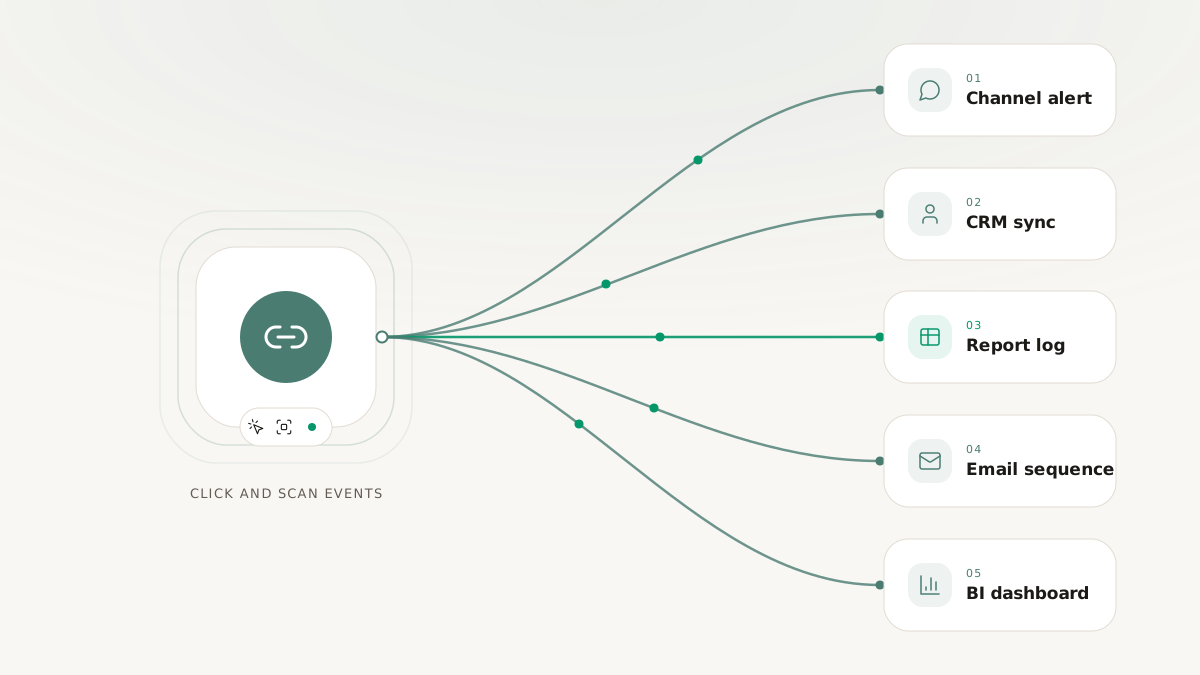
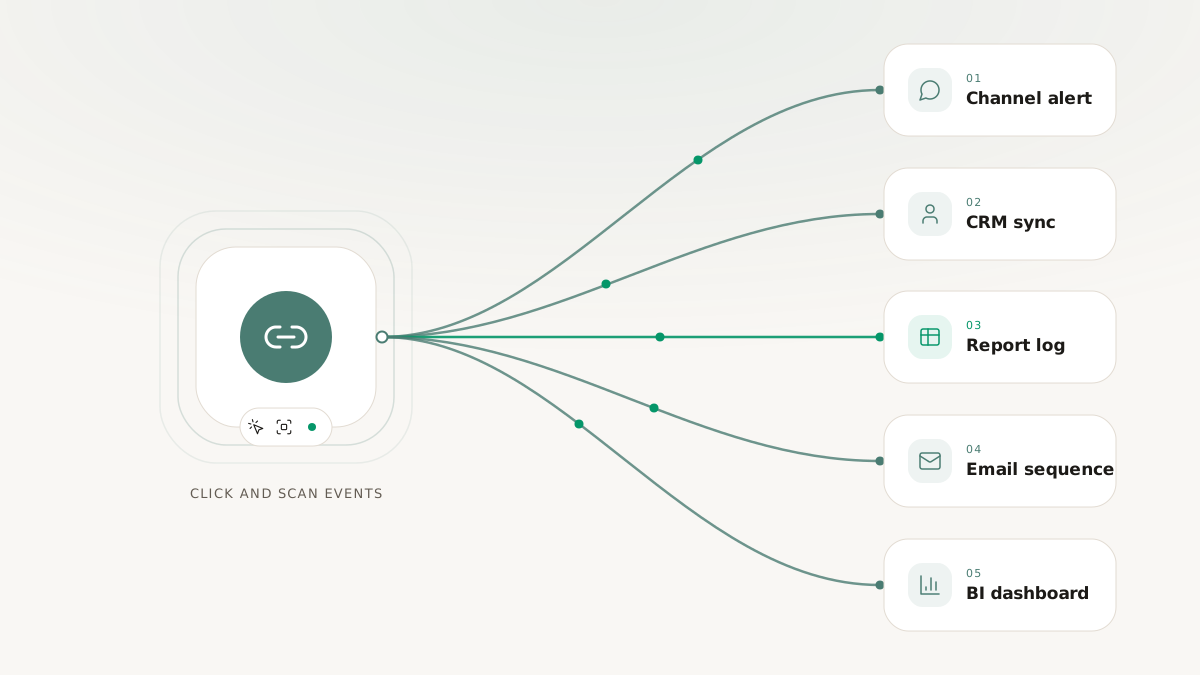
The easiest automation mistake marketing teams make is thinking they need one giant workflow to justify using a tool like Zapier. In practice, the best automations are usually the small ones that remove repetitive follow-up work from the campaign cycle.
That is especially true for short links. Short-link events are small, structured, and easy to route into the next action a team already takes:
- notify the team
- log the interaction
- update a record
- trigger a follow-up sequence
- push the event into reporting
The value is not in "automating everything." The value is in turning a meaningful campaign event into the next useful business action without waiting for someone to notice it manually.
Below are five practical Zapier-style automation patterns that fit the way most marketing teams actually work.
1. Log campaign clicks to a shared sheet
This is the simplest high-value automation.
Trigger: a click or QR scan event from a campaign link
Action: append a row to a shared spreadsheet or reporting log
Why it matters:
- campaign teams often need a lightweight shared log outside the dashboard
- agencies may need to expose activity to stakeholders who live in sheets
- operations teams can use the log as a simple QA surface during launch windows
What to store:
- timestamp
- short link or slug
- campaign tag
- country
- device category
- source or referrer
This is not a replacement for proper analytics. It is a useful shared operating surface for teams that need quick visibility.
2. Notify Slack when a high-priority link is clicked
Some links are operationally important enough that a human should know immediately when they are used.
Examples:
- a proposal link sent to a prospect
- an event registration QR code during a live launch
- a partner campaign link with limited runtime
- a support or incident response link tied to a temporary workflow
Trigger: click event on a tagged or filtered destination
Action: send a Slack notification to the owning channel
The key is filtering. You do not want every click creating noise. But when the event belongs to a high-priority campaign, a real-time alert can compress response time dramatically.
3. Update a CRM record when a lead engages
One of the most practical automation patterns is using short-link engagement as a signal inside CRM workflows.
Trigger: click event tied to a campaign, lead, or deal context
Action: update a CRM contact or deal record
This is especially useful when:
- links are generated for a named contact or account
- campaign tags identify the specific motion or stage
- the sales or lifecycle team needs a lightweight engagement signal before a formal conversion occurs
Example:
- A prospect receives a branded link to a demo page.
- The prospect clicks.
- A workflow updates the CRM record with the last-engaged timestamp and campaign source.
- The account owner sees the contact as recently active without opening the link dashboard manually.
This is a strong pattern because it moves the signal into the system where the team already works.
4. Start a follow-up sequence after a QR scan
QR campaigns often sit in the awkward space between offline and digital. A scan is not a conversion, but it is more meaningful than an impression. That makes it a useful trigger for follow-up.
Trigger: QR scan event
Action: begin a nurture or reminder sequence
This can take several forms:
- send a reminder email if the scanned page does not convert within a time window
- create an internal lead-review task for a field team
- move the contact into a campaign-specific lifecycle segment
- log booth or print engagement to a separate reporting system
The real benefit is timing. A scan-driven workflow can act while intent is still fresh rather than waiting for a weekly manual review.
5. Feed click events into BI or reporting pipelines
Not every automation has to end inside another SaaS tool. Sometimes the right answer is to forward the event to a warehouse intake service, internal endpoint, or reporting queue.
Trigger: click-event webhook or generic HTTP destination
Action: push structured event data into an internal reporting system
This is useful when:
- your team maintains a BI layer outside the short-link product
- stakeholders want short-link activity joined with spend, revenue, or CRM data
- you need a reporting surface that is customized around your business model
In these cases, Zapier may be the first step, or it may simply validate the workflow before the team moves it into a dedicated service.
How to choose the right automation first
If your team is just getting started, do not begin with the most technically ambitious workflow. Begin with the one that is easiest to verify and most obviously useful.
Good first automations usually have three traits:
- The event is easy to understand.
- The action is clearly valuable.
- Failure is easy to spot.
That is why a Slack notification, a spreadsheet append, or a CRM field update is often a better first automation than a complex multi-branch nurture sequence.
A few implementation rules that keep these workflows clean
Filter early
Do not send every short-link event into every workflow. Create narrow feeds for:
- specific domains
- campaign tags
- touch types
- spaces or teams
That keeps workflows purposeful and avoids accidental noise.
Treat events as at-least-once
Real delivery systems retry. Your receiving automation should tolerate duplicate events, especially if the downstream action changes data.
Keep the first action lightweight
If the workflow needs heavy processing, push the event into a queue or internal service quickly and let the heavier logic happen downstream.
Use structured fields, not just freeform link names
The cleaner your campaign metadata is, the better your automations will be. Tags, domains, spaces, and consistent UTM conventions make workflow logic easier to maintain.
The bigger lesson
The best short-link automations are usually not flashy. They simply remove the gap between "the event happened" and "the team acted on it."
That gap is where a lot of campaign inefficiency lives:
- someone forgets to log it
- someone notices too late
- someone copies data into the wrong place
- someone never routes the signal into the system that needed it
Automation closes that gap.